ZeroClaw Agent Masterclass — Full Tutorial
Everything you need to install, configure, and run ZeroClaw — the Rust agent runtime for a personal AI assistant you fully own: providers, channels, tools, security policy, gateway, and SOP engine.
Official: zeroclawlabs.ai · Docs: docs.zeroclawlabs.ai · Source: github.com/zeroclaw-labs/zeroclaw
This guide matches our OpenClaw and Hermes Agent Masterclass format: prose and lists, plus diagram and terminal GIFs at 1200×600.
Media assets (copy for Medium)
| Asset | URL |
|---|---|
| Mega overview | https://ayush7614.github.io/agentic-ai-ecosystem/guides/zeroclaw-agent-masterclass/assets/mega-zeroclaw-everything.gif |
| Runtime stack | https://ayush7614.github.io/agentic-ai-ecosystem/guides/zeroclaw-agent-masterclass/assets/diagram-zeroclaw-stack.gif |
| Config anatomy | https://ayush7614.github.io/agentic-ai-ecosystem/guides/zeroclaw-agent-masterclass/assets/diagram-config-anatomy.gif |
| Security layers | https://ayush7614.github.io/agentic-ai-ecosystem/guides/zeroclaw-agent-masterclass/assets/diagram-security-layers.gif |
| Blog poster | https://ayush7614.github.io/agentic-ai-ecosystem/guides/zeroclaw-agent-masterclass/assets/blog-poster-1200x600.png |
What you'll have at the end
- ZeroClaw installed (prebuilt or from source)
~/.zeroclaw/config.tomlwith provider, agent, risk profile, and one channel- CLI chat via
zeroclaw agent -a main - Telegram or Discord (or CLI-only) on the same agent loop
- Understanding of supervised autonomy, tool receipts, and optional YOLO dev mode
- Optional gateway dashboard and systemd/launchctl always-on service
Introduction — you own the agent, the data, the machine
ZeroClaw is an agent runtime shipped as a single Rust binary. It connects to LLM providers (Anthropic, OpenAI, Ollama, and ~20 more), delivers messages across 30+ channels (Discord, Telegram, Matrix, email, webhooks, voice, CLI), and executes tools — shell, browser, HTTP, hardware, custom MCP servers.
Everything runs on your hardware with your keys. Default posture is security-first: supervised autonomy, workspace boundaries, OS sandboxes, and cryptographic tool receipts on every action.
The project crossed 32k GitHub stars with a 100% Rust codebase — fast cold start, small binaries (minimal preset ~6.6 MB), and feature flags for embedded or server deployments.

Official repo only: github.com/zeroclaw-labs/zeroclaw — beware impersonation forks.
Part 1 — Architecture
flowchart TB
  CH[30+ Channels] --> GW[Gateway REST/WS]
  ACP[ACP — IDE JSON-RPC] --> RT[ZeroClaw runtime]
  GW --> RT
  RT --> AL[Agent loop]
  RT --> SEC[Security policy]
  RT --> SOP[SOP engine]
  AL --> PR[Providers]
  AL --> TO[Tools]
  AL --> MEM[Memory SQLite]
Layers:
- Channels — inbound/outbound adapters per platform
- Gateway — HTTP/WebSocket API + web dashboard
- Agent loop — ReAct-style tool use with routing and fallbacks
- Security — autonomy levels, sandboxes, command policy, receipts
- SOP engine — event-triggered procedures (cron, MQTT, webhook)
- Providers / Tools / Memory — pluggable backends
Full diagrams: Architecture overview (upstream book).

Part 2 — Four design opinions (philosophy)
ZeroClaw documents four opinions that shape every config decision:
- You own the stack — no mandatory cloud; keys stay local
- Security defaults beat YOLO defaults — supervised mode first
- Swap anything — providers, channels, tools via TOML aliases
- One runtime, many surfaces — CLI, gateway, ACP, channels share the loop
Read upstream Philosophy for the full essay.
Part 3 — Prerequisites
- macOS, Linux, Windows, FreeBSD, NixOS, or Docker
- No Rust required for prebuilt install (source build needs Rust toolchain)
- API key or local Ollama endpoint
- For Telegram/Discord: bot token from platform developer portal
Part 4 — Install
One-liner
The installer asks: prebuilt (seconds) or source (custom features). Both run zeroclaw quickstart at the end unless --skip-quickstart.
Useful flags
./install.sh --prebuilt              # skip prompt
./install.sh --source --preset minimal   # ~6.6 MB kernel preset
./install.sh --with-gateway          # force gateway support
./install.sh --dry-run --prebuilt    # preview only
./install.sh --uninstall             # remove
Platform notes: Linux · macOS · Windows · Docker — in upstream setup docs.
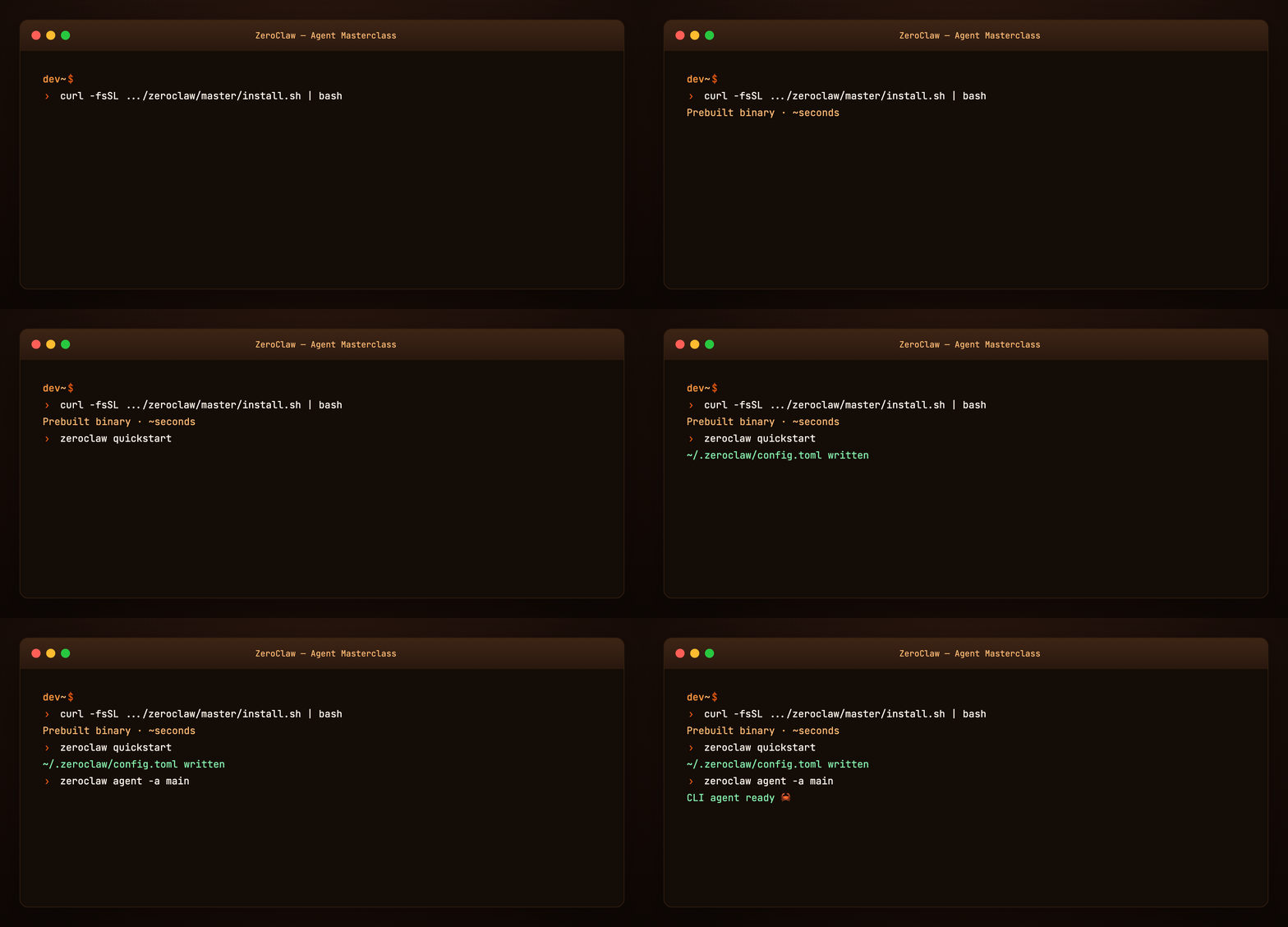
Part 5 — Quickstart and config.toml
zeroclaw quickstart    # wizard: provider, model, write config
zeroclaw agent -a main # interactive CLI chat
Config lives at ~/.zeroclaw/config.toml.
A minimal V3 config needs four section shapes:
[providers.models.<type>.<alias>]— model endpoint[agents.<alias>]— agent personality + provider reference[risk.<alias>]— autonomy and approval gates[channels.<type>.<alias>]— optional messaging surface
See examples/config.minimal.toml for a copy-ready starter.

Part 6 — Providers
ZeroClaw is provider-agnostic. Universal schema:
[providers.models.ollama.local]
type = "ollama"
base_url = "http://127.0.0.1:11434"
model = "llama3.2"

[agents.main]
model_provider = "ollama.local"
system_prompt_file = "~/.zeroclaw/agents/main.md"
Fallback chains keep the agent alive when a provider flakes — configure routing in upstream providers/routing.
OpenAI Codex subscription uses auth profiles (not raw api_key on the provider entry):
[providers.models.openai.coding]
model = "gpt-5-codex"
wire_api = "responses"
requires_openai_auth = true
Point agent: model_provider = "openai.coding". Check zeroclaw auth status if streaming falls back to non-streaming chat.
Part 7 — Agents and risk profiles
Each [agents.<alias>] entry defines one agent personality:
- System prompt (inline or file)
- Model provider reference
- Tool allow-list
- Linked risk profile
Risk profiles gate autonomy:
| Level | Behavior |
|---|---|
| supervised (default) | Medium-risk needs approval; high-risk blocked |
| YOLO | Dev/trusted boxes — minimal gates (upstream YOLO doc) |

Part 8 — Channels
One agent loop, many inboxes. Configure per-channel blocks:
[channels.telegram.main]
bot_token_env = "TELEGRAM_BOT_TOKEN"
allowed_users = [123456789]
agent = "main"
Supported families include Discord, Telegram, Matrix, email, webhooks, voice, and more — see channels overview.
Test flow:
- Create bot (e.g. Telegram
@BotFather) - Add channel block to config
- Export token env var
zeroclaw service restart- Message bot → same agent as CLI
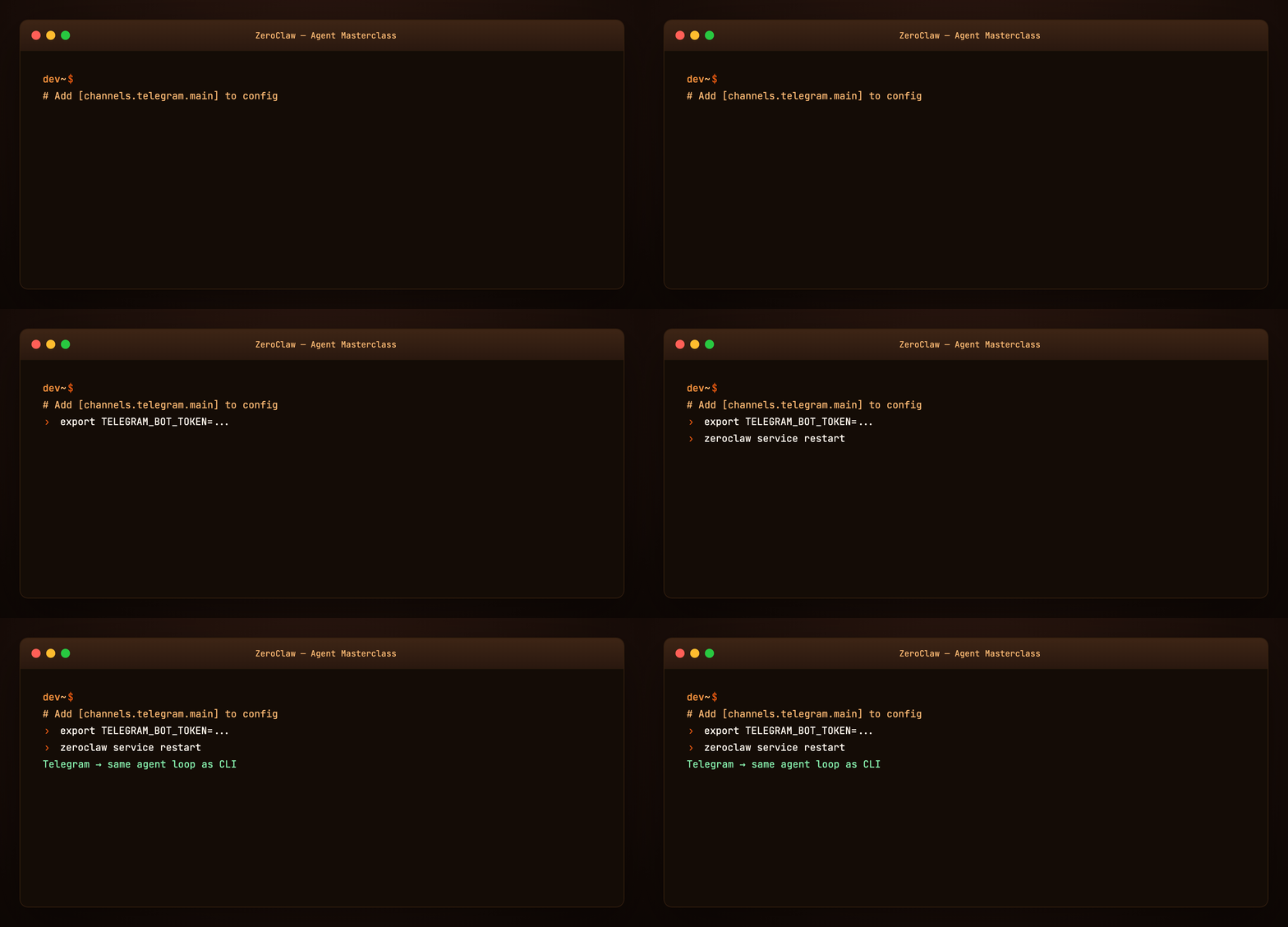
Example: examples/channel.telegram.toml
Part 9 — Security deep dive
ZeroClaw’s security model is harness engineering done in Rust:
- Workspace boundaries — agent cannot escape configured roots
- Command policy — allow/deny shell patterns
- OS sandboxes — Landlock, Bubblewrap, Seatbelt, Docker depending on platform
- Tool receipts — cryptographic record of each tool invocation
- Autonomy gates — human approval for medium/high risk
Default is supervised. Use YOLO only on isolated dev machines.
Cross-read: Harness Engineering verification + scope subsystems.
Part 10 — Tools
Built-in tool families:
- Shell — scripted automation with policy checks
- Browser — fetch, interact, verify UI work
- HTTP — API calls
- Hardware — GPIO/I2C/SPI on Pi, STM32, Arduino, ESP32 (Hardware docs)
- MCP — attach custom MCP servers like any modern harness
Tools connect through the agent loop; receipts log every action for audit.
Part 11 — Memory
ZeroClaw persists memory in SQLite with optional embeddings — searchable across sessions. The gateway dashboard exposes memory browsing and editing.
Unlike Hermes’s three-tier Markdown snapshot model (Hermes masterclass Part 6), ZeroClaw centralizes memory in the runtime database with dashboard UX.

Part 12 — Gateway and dashboard
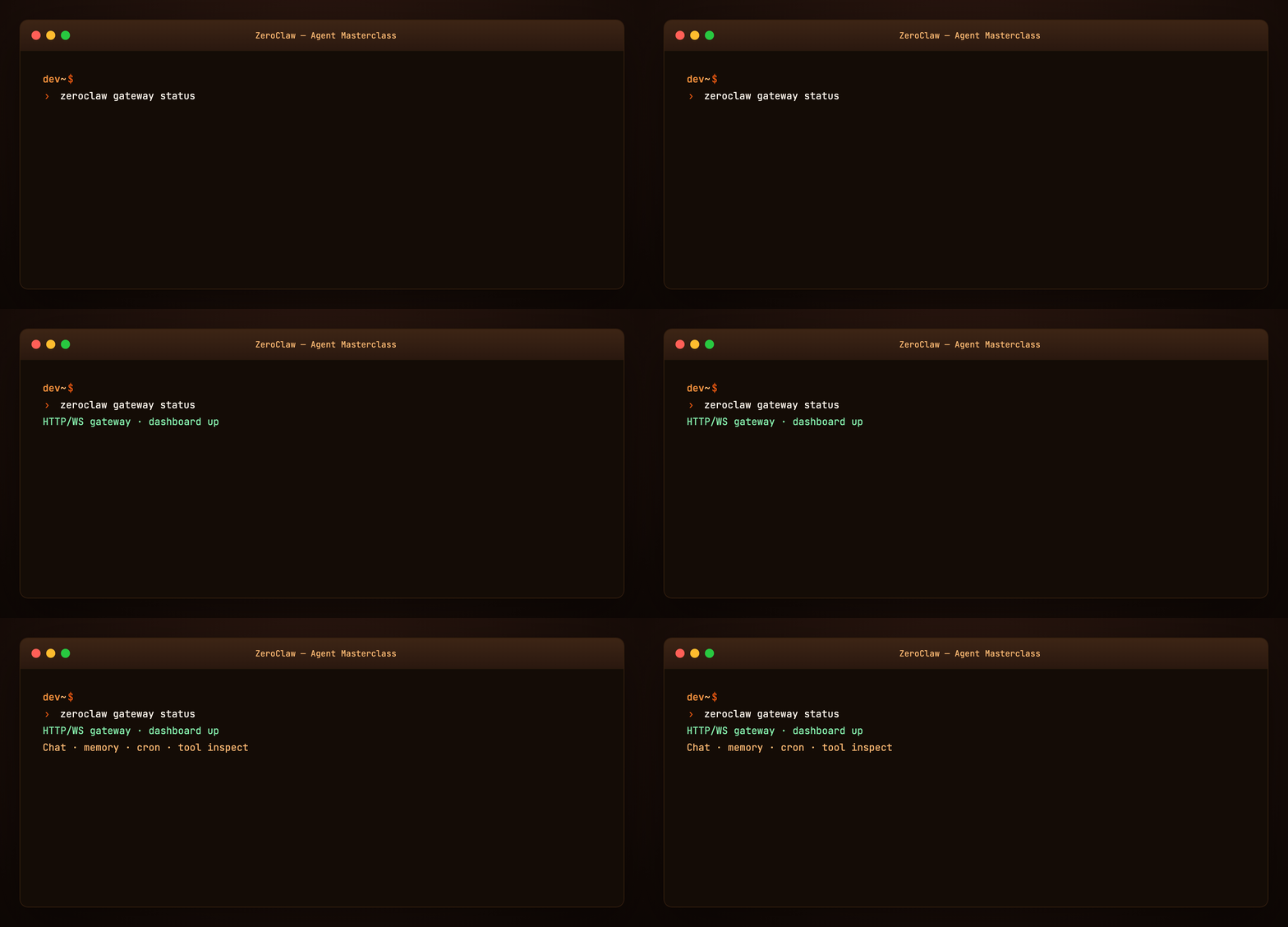
Enable gateway at install (--with-gateway) or in config. Provides:
- HTTP / WebSocket API for clients
- Web dashboard — chat, config editor, cron, tool inspection, memory browser
Useful for headless servers: run ZeroClaw on a VPS, chat from browser or phone channel.
Part 13 — SOP engine
Standard Operating Procedures — event-triggered workflows:
- Triggers: cron, MQTT, webhook, peripheral events
- Approval gates before destructive steps
- Resumable runs if interrupted
Example snippet: examples/sop.example.toml
Think of SOPs as deterministic backbone + agent intelligence where it matters — similar to CrewAI Flows or OpenClaw cron, but native to the runtime.
Part 14 — ACP (Agent Client Protocol)
ZeroClaw speaks ACP — JSON-RPC 2.0 over stdio — for IDE and editor integration. Your editor becomes a channel into the same agent loop as Telegram.
Docs: channels/acp
Parallels OpenCode’s IDE extension (OpenCode masterclass Part 14) — different protocol, same idea: harness follows the developer.
Part 15 — Always-on service
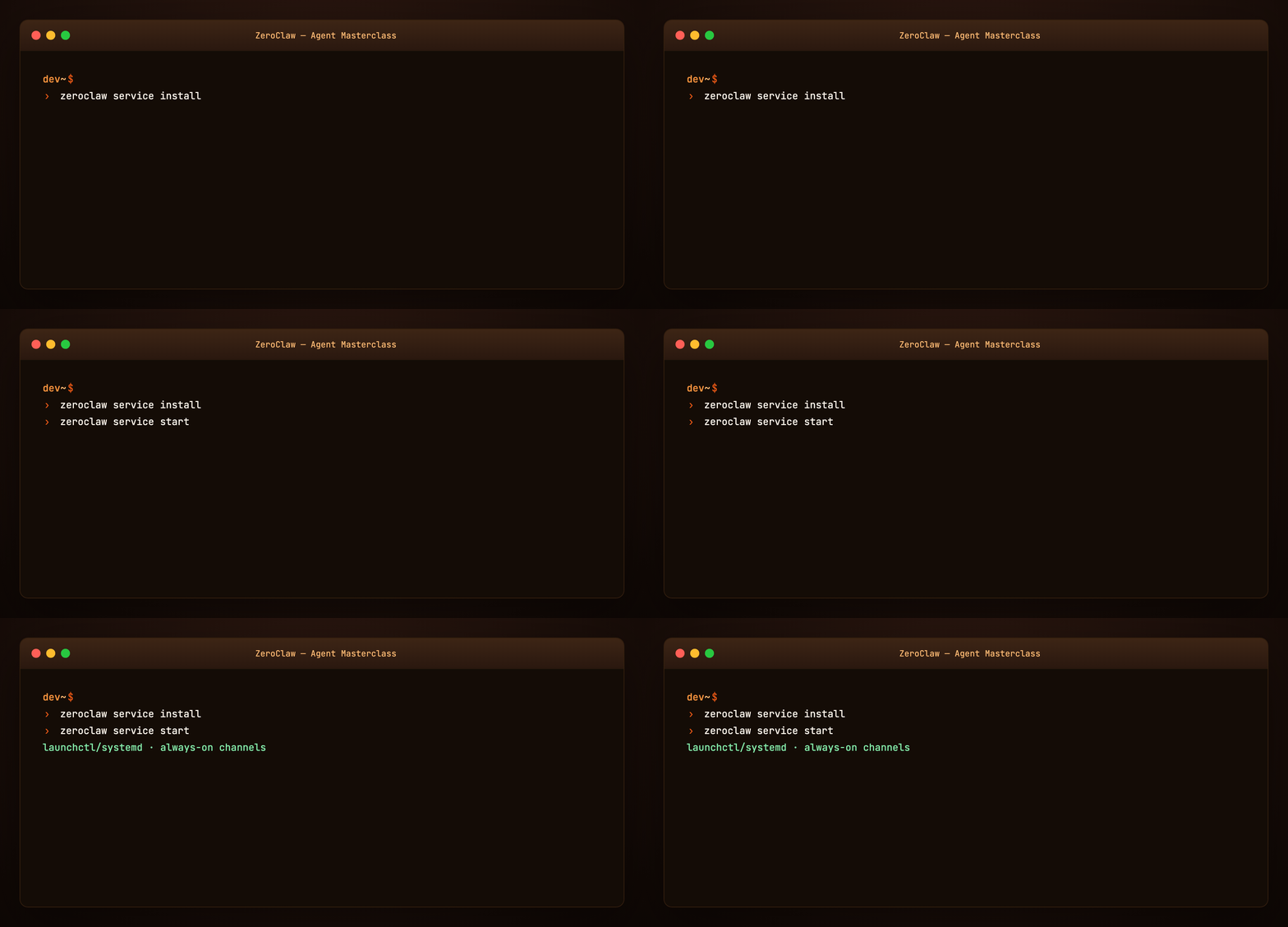
Register as OS service:
zeroclaw service install   # systemd · launchctl · Windows Service
zeroclaw service start
zeroclaw service status
Now channels stay connected while you close the laptop terminal — the runtime keeps running.
Part 16 — Hardware and edge (optional)
ZeroClaw targets edge and embedded seriously — Raspberry Pi agents with GPIO, firmware crates, minimal preset builds. Skip this part if you only need desktop assistant workflows.
Entry: upstream Hardware index.
Part 17 — ZeroClaw vs OpenClaw vs OpenCode
ZeroClaw vs OpenClaw: Both are personal assistant runtimes. OpenClaw is Node/TypeScript with a rich skill marketplace and WhatsApp focus. ZeroClaw is Rust-native, security-policy-first, with SOP engine and hardware paths. See Hermes vs OpenClaw for gateway comparison patterns.
ZeroClaw vs OpenCode: OpenCode optimizes repo coding in TUI/IDE. ZeroClaw optimizes multi-channel life + ops with enterprise-style security. Many builders use OpenCode in git and ZeroClaw for always-on inbox automation.
ZeroClaw vs Hermes: Hermes emphasizes learning loops (skills, Curator, GEPA). ZeroClaw emphasizes runtime security, channels, and SOP automation.
Part 18 — Troubleshooting
| Symptom | Fix |
|---|---|
command not found |
Re-run install.sh; check $PATH |
| Provider auth fails | zeroclaw auth status; re-run quickstart |
| Streaming fallback message | Usually transient — check provider health |
| Channel silent | Verify token env, allowed_users, service running |
| Approval spam | Tune risk profile; not YOLO on prod |
| Impersonation fork | Use only zeroclaw-labs/zeroclaw official repo |
Security issues: security@zeroclaw.dev — do not file public CVEs.
Regenerate visuals
cd guides/zeroclaw-agent-masterclass/assets
python3 render_gifs.py all
python3 render_blog_poster.py
cd ../../..
./scripts/prepare-docs.sh
Further reading
Summary
ZeroClaw is a Rust agent harness for people who want full ownership: one config file, many channels, enforced security, optional gateway UI, and SOP automation. Run quickstart, point an agent at your provider, wire Telegram, install the service — and you have a private assistant that doesn’t phone home.
The model is interchangeable. The runtime — policy, channels, receipts, memory — is the product you actually live with.