Stripe Projects MCP Server — Full Tutorial
Give your agent a safe credit card. Instead of pasting your root API keys into
an agent and hoping for the best, you stand up a small MCP server that exposes
four tools — provision, list, rotate_key, teardown — and let the agent
provision infrastructure through one protocol, with hard spend caps and keys it
can never over-use.
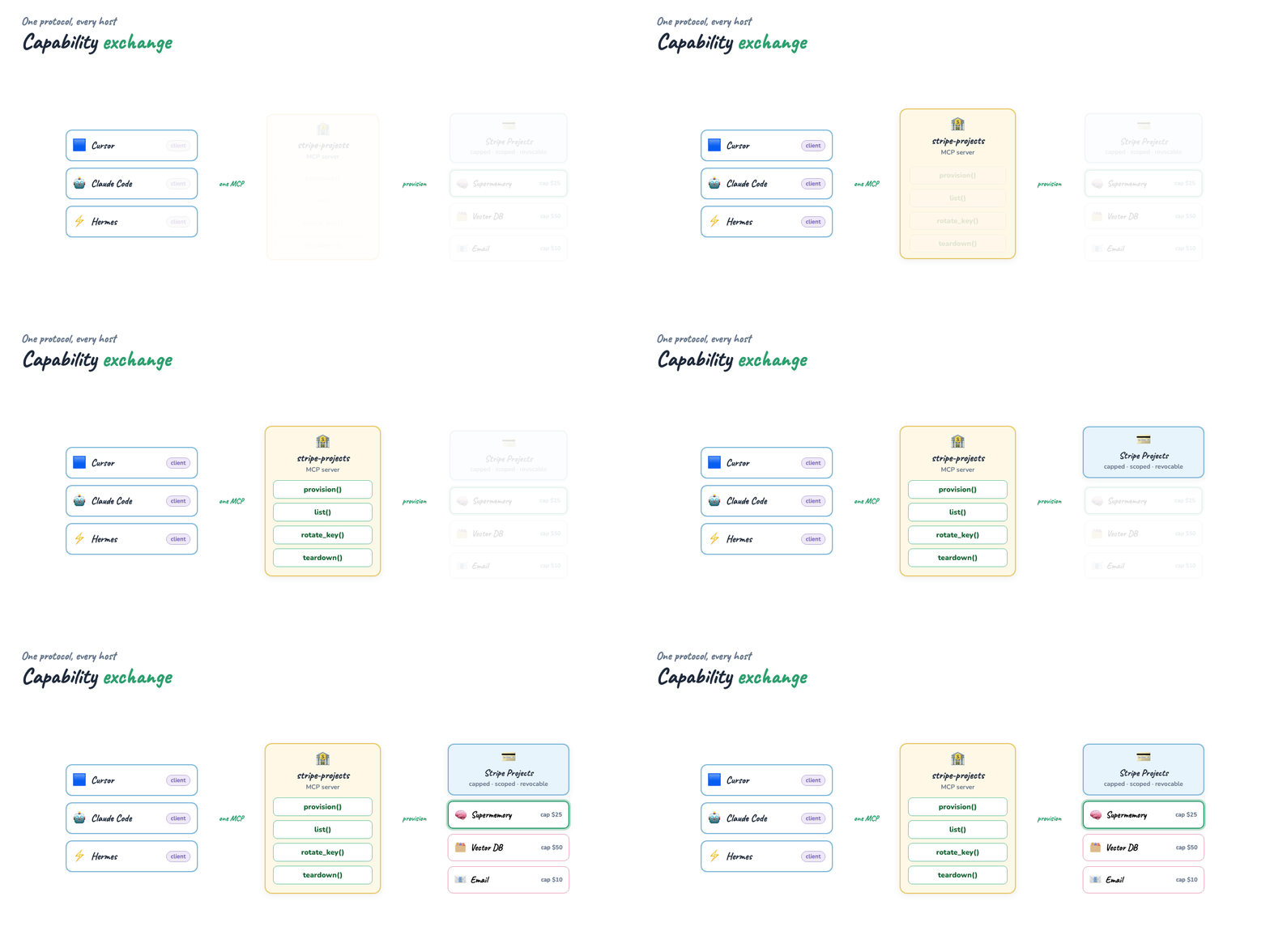
Format matches our MCP Visual Guide and Harness Engineering guides: prose, lists, runnable Python, and an animated capability-exchange diagram.
What you'll understand at the end
- Why handing an agent your root key is the wrong default — and what "scoped, capped, revocable" buys you
- How one MCP server lets Cursor, Claude Code, and Hermes provision infra identically
- How a provider registry turns "add a new provisionable service" into a one-line change
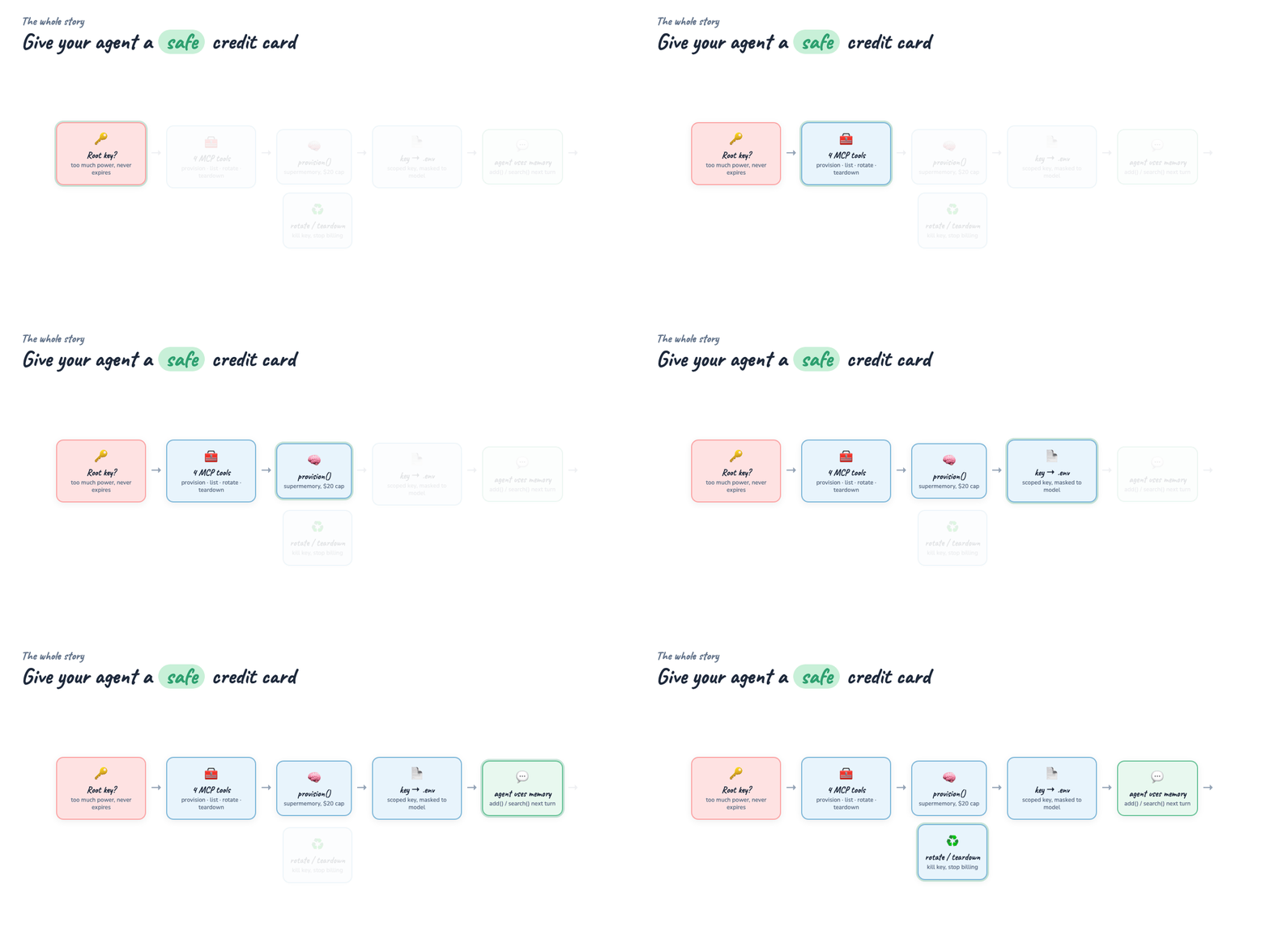
- The full loop: provision Supermemory → write the key → use memory → rotate → teardown
- How Stripe Projects maps onto the four MCP tools (and where to swap the simulation for the real API)
One-GIF overview (blog hero): mega-stripe-projects-everything.gif — root-key problem → four tools → provision Supermemory → use memory → rotate → teardown.
Introduction — the root-key problem
Agents are getting good enough to set up their own tools. "I need a vector DB." "I need somewhere to store long-term memory." "I need to send an email." The lazy answer is to drop every provider's root API key into the agent's environment. That key can do anything, never expires, and if it leaks through a transcript or a log, the blast radius is your whole account.
The safe answer borrows a pattern from the human world: a prepaid, capped card. The agent gets a credential that:
- only works for one provider,
- has a hard spend cap,
- can be rotated the instant you suspect a leak, and
- can be torn down to stop billing.
Stripe Projects is built for exactly this — programmatic projects with their own keys and limits. Wrap it in an MCP server and every agent host speaks the same provisioning language.
Part 1 — Why MCP for provisioning
You could give each agent a bespoke "provisioning" function. But then Cursor, Claude Code, and Hermes each need their own wiring, and every new provider means touching every host.
MCP collapses that. You write one server; hosts discover its tools at connect time through capability exchange. Add a provider to the registry and every host sees it at the next handshake — no host-side changes.
| Role | Here |
|---|---|
| Host | Cursor / Claude Code / Hermes — the app the human drives |
| Client | The MCP client inside the host, one per server connection |
| Server | stripe-projects — exposes provision / list / rotate_key / teardown |
If host/client/server isn't second nature yet, read the MCP Visual Guide first — this guide reuses its capability-exchange model.
Part 2 — The provider registry
The trick that keeps the server small: tools don't know about specific providers. They look providers up in a registry. Each entry says what env var the minted key should be written to and a sensible default spend cap.
REGISTRY: dict[str, Provider] = {
    "supermemory": Provider("supermemory", "Supermemory (agent long-term memory)",
                            "SUPERMEMORY_API_KEY", 25.0, "https://supermemory.ai"),
    "vector-db":   Provider("vector-db", "Managed vector database",
                            "VECTOR_DB_API_KEY", 50.0, "..."),
    "email":       Provider("email", "Transactional email sender",
                            "EMAIL_API_KEY", 10.0, "..."),
}
Adding a fourth provisionable service is one dict entry — and every connected
host gets it for free. See examples/providers.py.
Part 3 — The simulated Stripe Projects backend
So the guide runs offline, examples/stripe_projects.py
simulates Stripe Projects with the right shape: a Project carries a scoped key,
a spend cap, a status, and accruing usage. Provisioning mints a key
(sk_proj_sim_…), usage accrues against the cap, and hitting the cap auto-suspends
the project.
Crucially, public_view() never returns the full key — only a masked form — so a
leaked transcript can't expose the credential:
Going live: replace the bodies of provision / rotate_key / teardown /
record_usage with stripe projects CLI or API calls. Keep the return shapes and
nothing downstream changes.
Part 4 — The four tools
examples/server.py is a FastMCP server. Each tool is a
plain function with a docstring — that docstring is the schema the host shows the
model.
provision(name, provider, spend_cap_usd=0)— looks up the provider, asks the backend for a capped project, writes the minted key to.env, and returns a masked summary. The real key never goes back through the model.list_projects()— status, cap, usage, and remaining budget per project.rotate_key(name)— mints a new key (old one dies) and rewrites.env.teardown(name)— revokes the key and stops billing.
The provision tool's "write to .env, return only a mask" behaviour is the safety
core:
_upsert_env(prov.env_var, project.api_key)   # full key → .env only
summary = project.public_view()              # masked key → model
Part 5 — Provision, then use Supermemory
Provisioning is only half the story. The payoff is that the same agent immediately
uses what it stood up. examples/providers.py ships a
SupermemoryClient that calls the real API when a live key is present and the SDK is
installed, and otherwise falls back to a local JSON memory store — so the demo always
runs.
examples/agent_demo.py walks the whole arc:
provision("agent-memory", "supermemory", spend_cap_usd=15)→ key in.env- reload
.env, build the Supermemory client,add()a couple of memories - a later "session"
search()es and recalls them - accrue mock usage,
rotate_key, thenteardown
Run it:
You'll see the masked key, the memory round-trip (mode: local-fallback offline),
the rotation bumping key_version, and the final teardown flipping status to
torn_down.
Part 6 — Wire a real host
Point Cursor at the server with examples/cursor_mcp.json.example:
{
  "mcpServers": {
    "stripe-projects": {
      "command": "python",
      "args": ["examples/server.py"],
      "cwd": "/absolute/path/to/guides/stripe-projects-mcp"
    }
  }
}
Claude Desktop uses the same idea — see
examples/claude_desktop_config.json.example.
Once connected, the agent discovers all four tools plus the
stripe-projects://providers resource (the registry), and can provision on its own:
"Provision supermemory with a $20 cap, then remember that production is Postgres 16 in eu-west."
The agent calls provision, the key lands in .env, and the follow-up memory write
just works — across any host, because it's just MCP tools.
Part 7 — Guardrails worth keeping
- Never return full keys to the model. Write to
.env/secret store, return a mask. - Always set a cap. Default in the registry; let the agent lower it, never silently raise it.
- Rotate on suspicion, teardown on done. Both are one tool call.
- Scope per project. One leaked key revokes in isolation — not your whole account.
- Log provisioning events.
list_projects()is your audit surface.
Where to go next
- Swap the simulated backend for the real Stripe Projects API and add a budget-alert webhook.
- Add providers: a managed Postgres, an object store, an SMS sender — each is one registry entry.
- Gate
provisionbehind a human-approval step using your host's confirmation hooks (see Harness Engineering). - Give the agent a real memory backend end-to-end by dropping in a live
SUPERMEMORY_API_KEY.
License
Guide: MIT · MCP spec & SDKs and Supermemory: respective licenses