Google agents-cli Agent Masterclass — Full Tutorial
Everything you need to install, run, and build extraordinary agents with Google agents-cli — the CLI and skills that turn your coding assistant into an ADK + Google Cloud expert.
Official: github.com/google/agents-cli · Docs: google.github.io/agents-cli · Quickstart: Build Your First Agent
All terminal GIFs in this guide are verified recordings — captured with VHS running real uvx google-agents-cli commands. No simulated HTML terminals.
Media assets (copy for Medium)
| Asset | URL |
|---|---|
| Mega workflow | https://ayush7614.github.io/agentic-ai-ecosystem/guides/agents-cli-agent-masterclass/assets/mega-agents-cli-workflow.gif |
| Install verify | https://ayush7614.github.io/agentic-ai-ecosystem/guides/agents-cli-agent-masterclass/assets/step-01-install-verify.gif |
| Scaffold create | https://ayush7614.github.io/agentic-ai-ecosystem/guides/agents-cli-agent-masterclass/assets/step-02-scaffold-create.gif |
| Install + info | https://ayush7614.github.io/agentic-ai-ecosystem/guides/agents-cli-agent-masterclass/assets/step-03-install-info.gif |
| Eval metrics | https://ayush7614.github.io/agentic-ai-ecosystem/guides/agents-cli-agent-masterclass/assets/step-04-eval-metrics.gif |
| Run agent | https://ayush7614.github.io/agentic-ai-ecosystem/guides/agents-cli-agent-masterclass/assets/step-05-run-agent.gif |
| Login status | https://ayush7614.github.io/agentic-ai-ecosystem/guides/agents-cli-agent-masterclass/assets/step-06-login-status.gif |
| Architecture (official) | https://ayush7614.github.io/agentic-ai-ecosystem/guides/agents-cli-agent-masterclass/assets/architecture-official.png |
| Blog poster | https://ayush7614.github.io/agentic-ai-ecosystem/guides/agents-cli-agent-masterclass/assets/blog-poster-1200x600.png |
What you'll have at the end
agents-cliv1.0+ installed and verified- Skills loaded into your coding agent (Cursor, Claude Code, Codex, Antigravity)
- A scaffolded ADK agent project with eval boilerplate
- Understanding of scaffold → build → eval → deploy → observe lifecycle
- Ideas for extraordinary multi-tool, multi-agent, and RAG projects
Introduction — agents-cli is not another chatbot
agents-cli is Google's Agent Development Lifecycle toolchain for the Gemini Enterprise Agent Platform. It wraps the Agent Development Kit (ADK) with:
- CLI commands — scaffold, run, eval, deploy, publish
- 7 agent skills — workflow, ADK code, scaffold, eval, deploy, publish, observability
- Coding-agent integration — works with Claude Code, Codex, Antigravity — not instead of them
flowchart LR
  CA[Coding agent] --> SK[agents-cli skills]
  SK --> SC[scaffold / create]
  SC --> ADK[ADK agent code]
  ADK --> EV[eval generate + grade]
  EV --> DP[deploy Cloud Run / GKE / Runtime]
  DP --> OB[observability traces]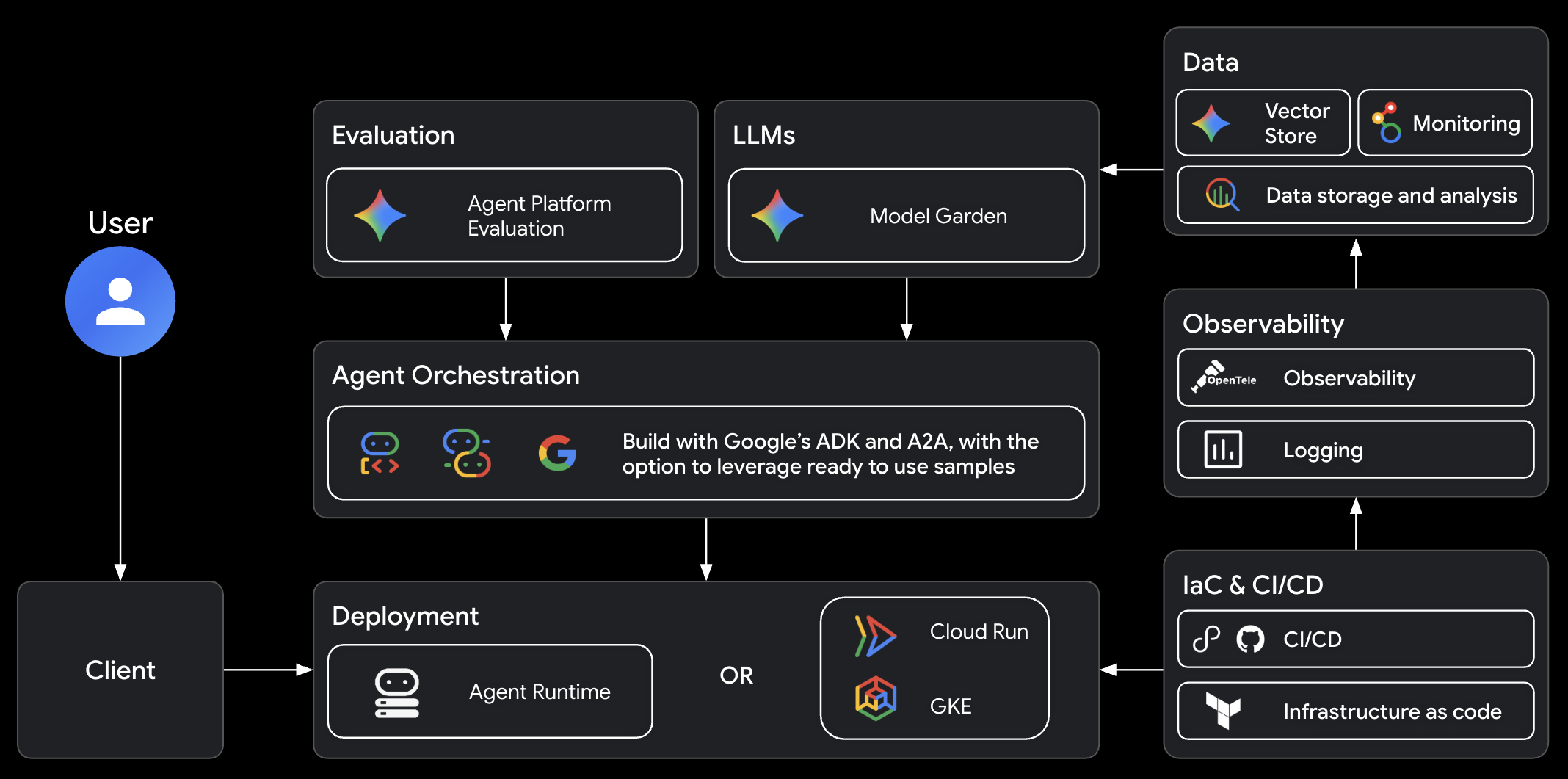
Source: google/agents-cli architecture

Part 1 — Prerequisites
| Requirement | Install |
|---|---|
| Python 3.11+ | python3 --version |
| uv | docs.astral.sh/uv |
| Node.js | For npx skills add |
| API access (local) | AI Studio API key or agents-cli login for GCP |
| API access (deploy) | Google Cloud project with billing |
You do not need Google Cloud for local prototype work — AI Studio key is enough for run and eval.
Part 2 — Install agents-cli
Full setup (CLI + skills)
This installs the CLI and pushes skills to detected coding agents.
Skills only
Your coding agent reads skills and invokes agents-cli commands on your behalf.
Verify (recorded GIF)

Part 3 — Authenticate
For local dev, set in your project .env:

Part 4 — The 7 agent skills
| Skill | What your coding agent learns |
|---|---|
google-agents-cli-workflow |
Full lifecycle, code preservation, model selection |
google-agents-cli-adk-code |
ADK Python — agents, tools, callbacks, state |
google-agents-cli-scaffold |
create, enhance, upgrade |
google-agents-cli-eval |
Metrics, datasets, LLM-as-judge, prompt optimize |
google-agents-cli-deploy |
Agent Runtime, Cloud Run, GKE, CI/CD |
google-agents-cli-publish |
Gemini Enterprise registration |
google-agents-cli-observability |
Cloud Trace, logging, BigQuery |
Prompt pattern: "Use agents-cli to build …" activates the right skills automatically.
Part 5 — Scaffold your first agent
Prototype mode (no cloud deploy)
uvx google-agents-cli create caveman-agent --prototype --yes
cd caveman-agent
uvx google-agents-cli install
Creates:
caveman-agent/
├── app/agent.py          # ADK root agent
├── agents-cli-manifest.yaml
├── tests/eval/           # eval datasets + config
├── pyproject.toml
├── Dockerfile
└── GEMINI.md             # agent dev instructions

Check project config
Shows: project name, deployment target, agent directory, region, A2A support.

Part 6 — Build the caveman compressor (official tutorial)
Google's quickstart tutorial walks through a caveman compressor — verbose text → terse grunts.
Tell your coding agent:
Use agents-cli to build a caveman-style agent that compresses verbose text into terse, technical grunts
Or edit app/agent.py directly — see examples/caveman-agent.py:
root_agent = Agent(
    name="caveman_agent",
    model=Gemini(model="gemini-flash-latest"),
    instruction="""You caveman compressor. Human give long words, you make short.
Rules:
- No articles. No filler. No fluff.
- Short grunts. Simple words.
...
""",
)
Save spec first: examples/agents-cli-spec.caveman.md → .agents-cli-spec.md
Part 7 — Run locally
Starts a local server (default port 18080), runs one turn, stops.
uvx google-agents-cli playground    # web UI for manual chat
uvx google-agents-cli run --start-server   # keep server warm for repeated prompts

Expected caveman output:
Part 8 — Evaluate (the most important phase)
agents-cli ships 17+ built-in metrics:
Includes: FINAL_RESPONSE_QUALITY, INSTRUCTION_FOLLOWING, TOOL_USE_QUALITY, SAFETY, HALLUCINATION, multi-turn variants.

Run evals
uvx google-agents-cli eval generate    # run agent on dataset → traces
uvx google-agents-cli eval grade       # LLM-as-judge scoring
# Or chained:
uvx google-agents-cli eval run
Critical rule: Never assert LLM output in pytest — use eval, not unit tests, for behavioral quality.
Iterate 5–10+ times until thresholds pass. Tell your coding agent:
The greeting test is too polite. Make it more caveman. Re-run eval.
Advanced: eval dataset synthesize, eval compare, eval analyze, eval optimize
Part 9 — Deploy to Google Cloud
After eval passes and you explicitly approve:
| Target | When to use |
|---|---|
| Agent Runtime | Managed Gemini Enterprise scale |
| Cloud Run | HTTP API, fast iteration |
| GKE | Kubernetes control, custom networking |
Cloud Trace enabled by default after deploy.
Part 10 — Publish & observe
uvx google-agents-cli publish gemini-enterprise
uvx google-agents-cli infra single-project # observability infra
Open Cloud Trace explorer — see spans per LLM call and tool execution.
Part 11 — CLI command reference
| Command | Purpose |
|---|---|
create <name> |
New agent from template |
scaffold enhance |
Add deploy / CI/CD / RAG to existing |
run "prompt" |
One-shot local inference |
playground |
Web UI |
eval generate / grade |
Behavioral testing |
deploy |
Push to GCP |
lint |
Ruff code quality |
update |
Reinstall skills to all IDEs |
Full list: agents-cli README
Part 12 — Mind-blowing project ideas
Use agents-cli skills + ADK to build these — each uses a different superpower:
1. Incident Gruntifier (caveman++)
On-call Slack bot that turns 500-word postmortem drafts into 3-line caveman summaries and opens a Jira ticket via tool. Multi-tool agent with evals for brevity + accuracy.
2. Meeting → Action Agent
Ingests transcript → outputs ADK tool calls: calendar events, email drafts, Linear tasks. Eval on TOOL_USE_QUALITY and MULTI_TURN_TASK_SUCCESS.
3. RAG Doc Oracle
Clone rag-vector-search sample from agents-cli catalog. Agent answers from your PDFs with grounding eval (GROUNDING, HALLUCINATION metrics).
4. A2A Agent Mesh
Two agents: Researcher (search tool) + Writer (compression). A2A protocol built into ADK scaffold — agents talk to each other.
5. Self-Optimizing Persona
Use eval optimize to auto-tune instructions until caveman tone scores 95%+ on INSTRUCTION_FOLLOWING — watch prompts evolve across eval iterations.
6. Deploy-in-60-Seconds Demo
Prototype locally → scaffold enhance --deployment-target cloud_run → deploy → live public URL. Record the VHS GIF of the deploy output for your portfolio.
Prompt to start any of these:
Use agents-cli workflow skill. Read .agents-cli-spec.md.
Scaffold prototype, implement ADK tools, write 3 eval cases,
run eval generate + grade, show me failures before fixing.
Part 13 — Work with Cursor / Claude Code
After uvx google-agents-cli setup, skills appear in your agent's skill directory.
Example prompts:
| Goal | Prompt |
|---|---|
| New agent | Use agents-cli to build a [description] agent |
| Add deploy | Use agents-cli deploy skill — enhance for Cloud Run |
| Fix eval | Run agents-cli eval grade and fix failing cases |
| Add tool | Use google-agents-cli-adk-code to add a Google Search tool |
Pair with our MCP Visual Guide to expose deployed agents as MCP servers.
Part 14 — agents-cli vs raw ADK
| agents-cli | ADK alone | |
|---|---|---|
| Scaffolding | create + eval + CI boilerplate |
Manual |
| Coding agent skills | 7 lifecycle skills | None |
| Eval suite | Built-in metrics + optimize | Build yourself |
| Deploy | One command + enhance | Custom Terraform |
| Best for | Enterprise GCP agents | Embedded Python apps |
Part 15 — Troubleshooting
| Symptom | Fix |
|---|---|
Not authenticated |
agents-cli login -i or set GOOGLE_API_KEY |
Empty run response |
Check API key; verify .env |
invalid_grant on create |
GCP creds stale — login again or use --prototype |
| Eval always fails | Start with 1–2 cases; use eval analyze for clusters |
| Model 404 | Don't change model unless asked — use gemini-flash-latest |
Part 16 — Regenerate verified GIFs
All GIFs are recorded from assets/tapes/*.tape using VHS:
cd guides/agents-cli-agent-masterclass/assets/tapes
vhs step-01-install.tape
vhs step-02-scaffold.tape
# … or:
cd .. && ./render_real_gifs.sh
Requirement: brew install vhs and uv on PATH. Each tape runs real shell commands.
Part 17 — Hands-on checklist
# 1. Install
uvx google-agents-cli setup
# 2. Auth
uvx google-agents-cli login -i # or AI Studio key in .env
# 3. Scaffold
uvx google-agents-cli create my-agent --prototype --yes
cd my-agent && uvx google-agents-cli install
# 4. Run
uvx google-agents-cli run "Hello from ADK"
# 5. Eval
uvx google-agents-cli eval metric list
uvx google-agents-cli eval run
# 6. (Optional) Deploy — with human approval
uvx google-agents-cli scaffold enhance . --deployment-target cloud_run
uvx google-agents-cli deploy
Part 18 — FAQ (from Google)
Is this an alternative to Claude Code?
No — it's a tool for coding agents.
Need Google Cloud for local dev?
No — AI Studio API key works for create, run, eval.
Use without a coding agent?
Yes — every CLI command works standalone.
Extend with other skills?
Yes — pair with google/skills for GCP foundations or agent-skills for SWE workflows.
Further reading
Summary
agents-cli turns your existing coding assistant into a Google Cloud agent factory. Install with uvx google-agents-cli setup, scaffold with create, smoke-test with run, prove quality with eval, ship with deploy. The skills handle ADK patterns so you focus on what the agent does — caveman compressors, RAG oracles, or multi-agent meshes.
Every GIF in this guide was recorded from a real terminal. Clone the tapes, re-run them, and verify yourself.