Anthropic Cybersecurity Skills — Full Tutorial
Give any AI agent the structured decision-making of a senior security analyst — not generic web search, but step-by-step playbooks mapped to MITRE ATT&CK, NIST CSF 2.0, MITRE ATLAS, D3FEND, and NIST AI RMF.
Based on mukul975/Anthropic-Cybersecurity-Skills (754 skills · 26 domains · Apache 2.0).
Community project — not affiliated with Anthropic PBC.
What you'll learn
- What the library is and why it exists
- How the agentskills.io standard enables progressive disclosure
- All five framework mappings and how to use them in compliance workflows
- Install on Claude Code, Cursor, Copilot, Codex CLI, Gemini CLI, Hermes, and MCP agents
- Skill anatomy — frontmatter, Workflow, Verification, references, scripts
- End-to-end examples: memory forensics, threat hunting, cloud IR
- All 26 security domains and when to activate each
- Contributing, responsible use, citation, and troubleshooting
Table of contents
- Part 1 — The problem this solves
- Part 2 — Library at a glance
- Part 3 — Architecture and progressive disclosure
- Part 4 — Five frameworks, one skill library
- Part 5 — Quick start installation
- Part 6 — Claude Code setup
- Part 7 — Cursor setup
- Part 8 — GitHub Copilot and Codex CLI
- Part 9 — Gemini CLI and other platforms
- Part 10 — Hermes Agent integration
- Part 11 — Skill anatomy deep dive
- Part 12 — How agents discover and execute skills
- Part 13 — Walkthrough: credential theft in a memory dump
- Part 14 — Walkthrough: hypothesis-driven threat hunting
- Part 15 — Walkthrough: multi-cloud breach scoping
- Part 16 — All 26 security domains
- Part 17 — MITRE ATT&CK v19.1 coverage
- Part 18 — Compliance and risk frameworks in practice
- Part 19 — Casky Playground and GARS-2026
- Part 20 — Contributing your own skill
- Part 21 — Security, ethics, and authorized use
- Part 22 — Troubleshooting
- Part 23 — Citation and license
Part 1 — The problem this solves
The cybersecurity workforce gap hit 4.8 million unfilled roles globally in 2024 (ISC2). AI agents can help close that gap — but only if they have structured domain knowledge to work from.
Today's agents can write code and search the web. They typically cannot:
- Pick the right Volatility3 plugin for a suspicious memory dump
- Know which Sigma rules catch Kerberoasting
- Scope a cloud breach across AWS, Azure, and GCP with consistent playbooks
- Map findings to ATT&CK techniques without hallucinating IDs
Existing security repos give you wordlists, payloads, or exploit code. None give an AI agent the decision workflow a senior analyst follows: prerequisites, step order, verification, and framework mapping.
Anthropic Cybersecurity Skills fills that gap: 754 skills, each a practitioner playbook in agentskills.io format — YAML frontmatter for discovery, Markdown body for execution, optional references/scripts/assets for depth.
Part 2 — Library at a glance
| Metric | Value |
|---|---|
| Skills | 754 (production-grade, growing on main) |
| Security domains | 26 |
| Framework mappings | 5 — ATT&CK, NIST CSF 2.0, ATLAS, D3FEND, NIST AI RMF |
| Standard | agentskills.io |
| License | Apache 2.0 |
| Maintainer | @mukul975 (community) |
What it is not
- Not an Anthropic official product
- Not a script dump or payload collection
- Not a replacement for authorization, legal scope, or human judgment
What it is
- An AI-native knowledge base built for agent toolchains
- Validated ATT&CK v19.1 mappings via
mitreattack-python— zero revoked IDs - The only open-source skills library with unified five-framework coverage per skill
Part 3 — Architecture and progressive disclosure
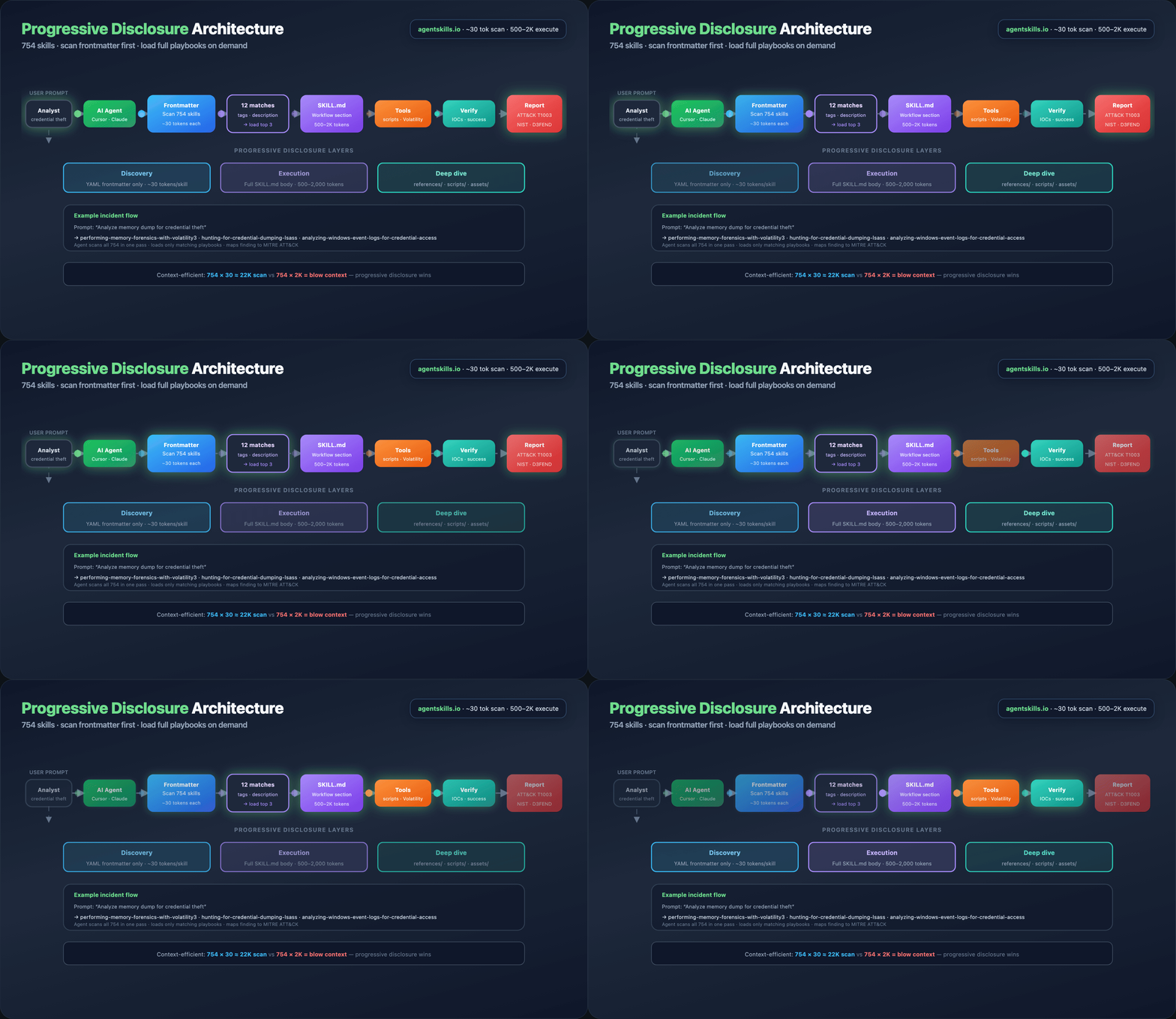
sequenceDiagram
    participant U as Analyst
    participant A as AI Agent
    participant F as Frontmatter scan
    participant S as SKILL.md body
    participant T as Tools/scripts

    U->>A: Analyze memory dump for credential theft
    A->>F: Scan 754 skills (~30 tokens each)
    F-->>A: 12 matches by tags/description
    A->>S: Load top 3 full skills (~500–2K each)
    S->>T: Execute Workflow steps
    T-->>A: Command output + artifacts
    A->>S: Run Verification section
    A-->>U: Report + ATT&CK T1003 mapping
Progressive disclosure keeps context windows manageable:
| Stage | Tokens (typical) | Content |
|---|---|---|
| Discovery | ~30 per skill | YAML frontmatter only |
| Execution | 500–2,000 per skill | Full SKILL.md body |
| Deep dive | Variable | references/, scripts/, assets/ |
An agent can scan all 754 skills in one pass, then load only the three that match the incident.
Regenerate the architecture GIF:
Part 4 — Five frameworks, one skill library
No other open-source skills library maps every skill to all five frameworks. One skill, five compliance checkboxes.
| Framework | Version | Scope in repo | What it maps |
|---|---|---|---|
| MITRE ATT&CK | v19.1 | 15 tactics · 286 techniques | Adversary behaviors and TTPs |
| NIST CSF 2.0 | 2.0 | 6 functions · 22 categories | Organizational security posture |
| MITRE ATLAS | v5.4 | 16 tactics · 84 techniques | AI/ML adversarial threats |
| MITRE D3FEND | v1.3 | 7 categories · 267 techniques | Defensive countermeasures |
| NIST AI RMF | 1.0 | 4 functions · 72 subcategories | AI risk management |
Example — one skill, five mappings
Skill: analyzing-network-traffic-of-malware
| Framework | Mapping |
|---|---|
| ATT&CK | T1071 (Application Layer Protocol) |
| NIST CSF | DE.CM |
| ATLAS | AML.T0047 |
| D3FEND | D3-NTA |
| AI RMF | MEASURE-2.6 |
Full reference: Framework mappings.
Part 5 — Quick start installation
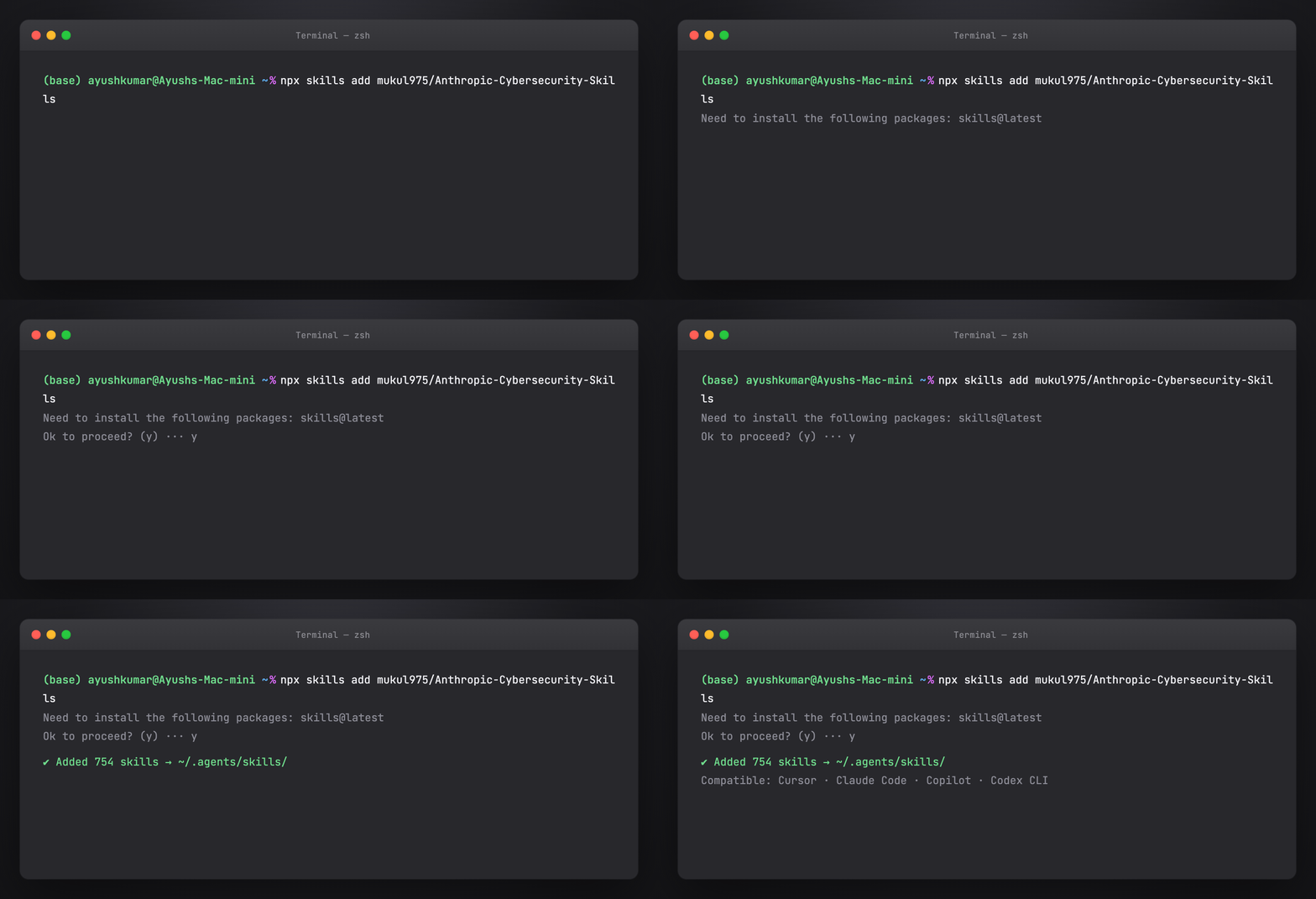
Option A — npx (recommended)
Works with any agentskills.io-compatible platform:
The installer registers skills in your agent's configured skills directory.
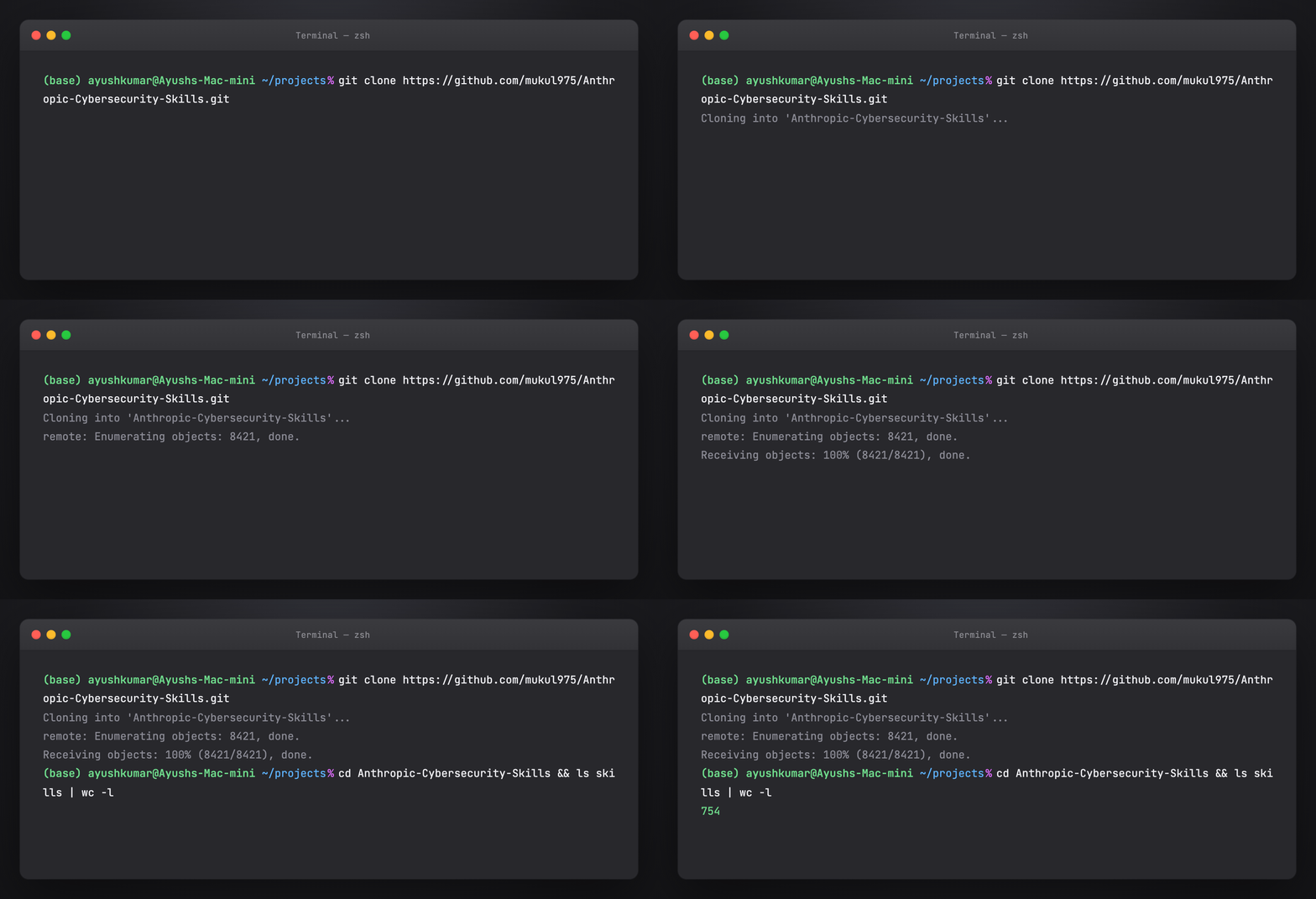
Option B — Git clone
git clone https://github.com/mukul975/Anthropic-Cybersecurity-Skills.git
cd Anthropic-Cybersecurity-Skills
Inspect skills/ — each subdirectory is one skill with SKILL.md at the root.
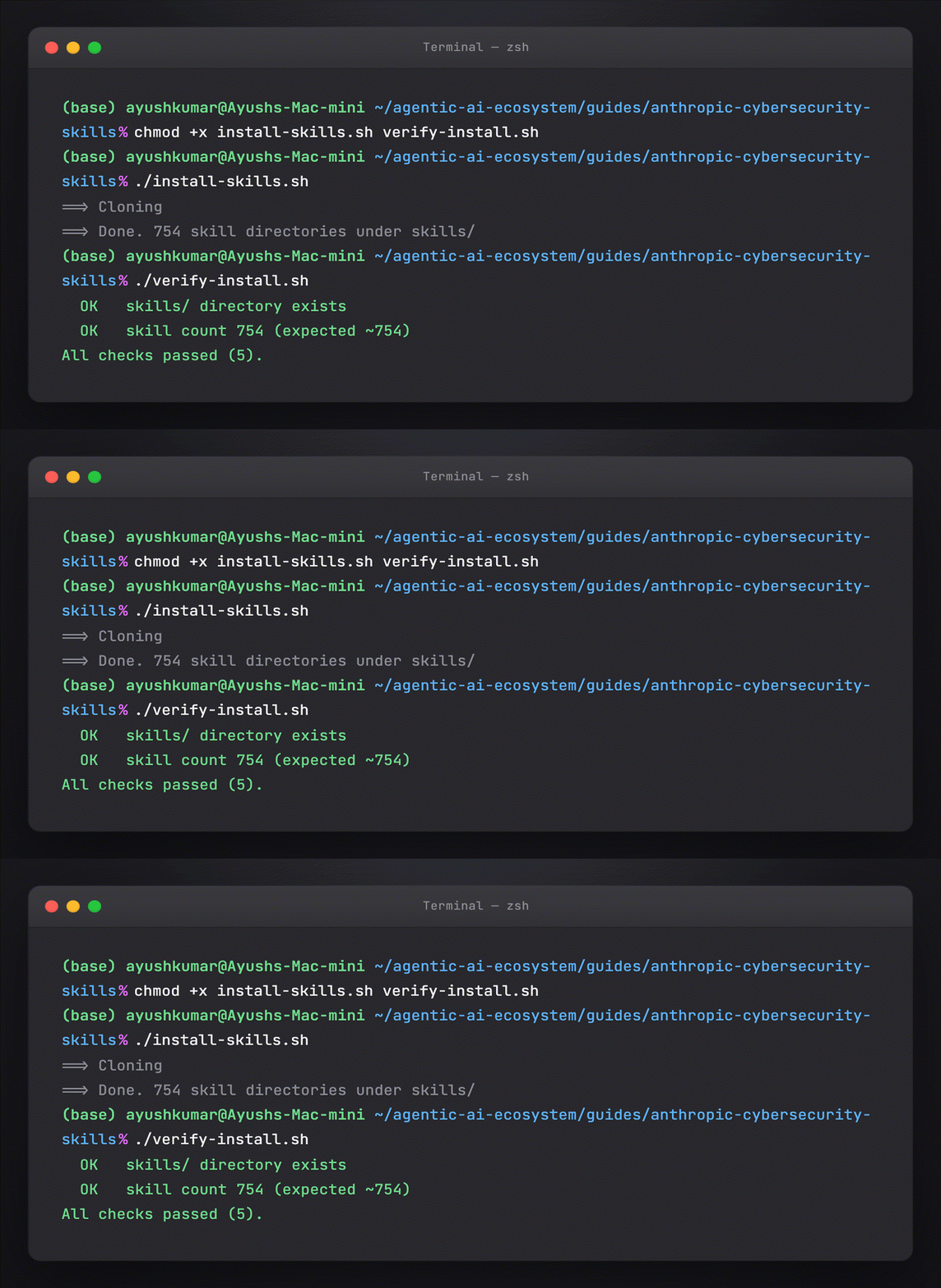
Option C — This guide's helper script
cd guides/anthropic-cybersecurity-skills
chmod +x install-skills.sh verify-install.sh
./install-skills.sh
./verify-install.sh
Default clone path: ~/.cybersec-skills/Anthropic-Cybersecurity-Skills. Override:
Regenerate terminal screenshots (macOS-style window, matching tutorial visuals):
cd guides/anthropic-cybersecurity-skills/assets
python3 render_install_screenshots.py png    # static PNGs
python3 render_install_screenshots.py gif    # animated typing GIFs per step
Requires Playwright + Chromium (pip install playwright && playwright install chromium) and ffmpeg for GIFs.
Part 6 — Claude Code setup
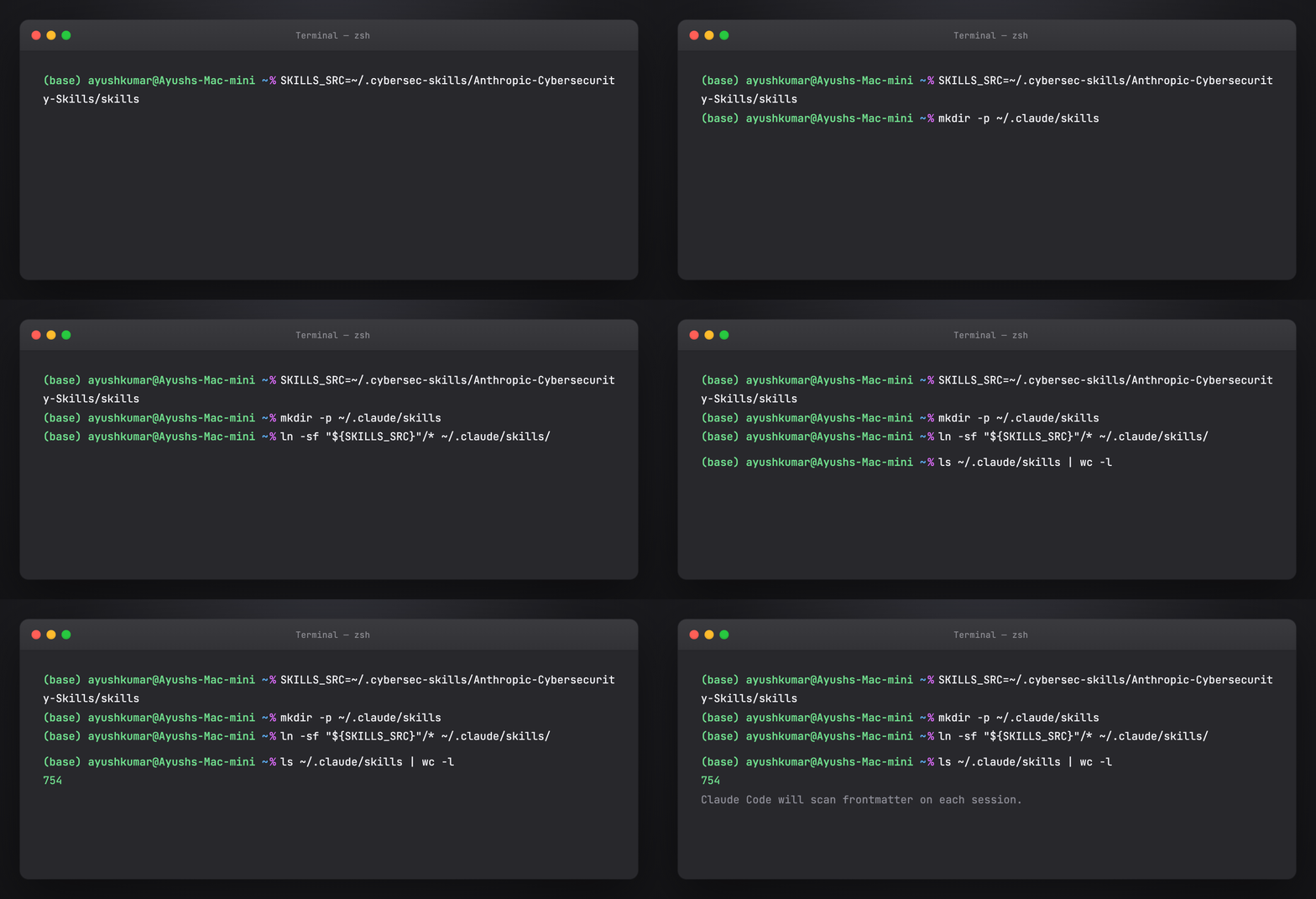
Claude Code loads skills from .claude/skills/ (project) or ~/.claude/skills/ (global).
Global install (all projects)
SKILLS_SRC=~/.cybersec-skills/Anthropic-Cybersecurity-Skills/skills
mkdir -p ~/.claude/skills

# Symlink entire library (754 skills — high discovery surface)
ln -sf "${SKILLS_SRC}"/* ~/.claude/skills/

# Or copy a subset — e.g. DFIR only
cp -r "${SKILLS_SRC}"/performing-memory-forensics-with-volatility3 ~/.claude/skills/
cp -r "${SKILLS_SRC}"/hunting-for-credential-dumping-lsass ~/.claude/skills/
Project-scoped (one engagement)
mkdir -p .claude/skills
ln -sf ~/.cybersec-skills/Anthropic-Cybersecurity-Skills/skills/* .claude/skills/
Verify in Claude Code
Start a session and ask:
Use the performing-memory-forensics-with-volatility3 skill. List prerequisites and the first three Workflow steps only.
Claude should read SKILL.md and cite structured sections — not invent generic Volatility commands.
See also: Claude Code .claude/ tutorial.
Part 7 — Cursor setup
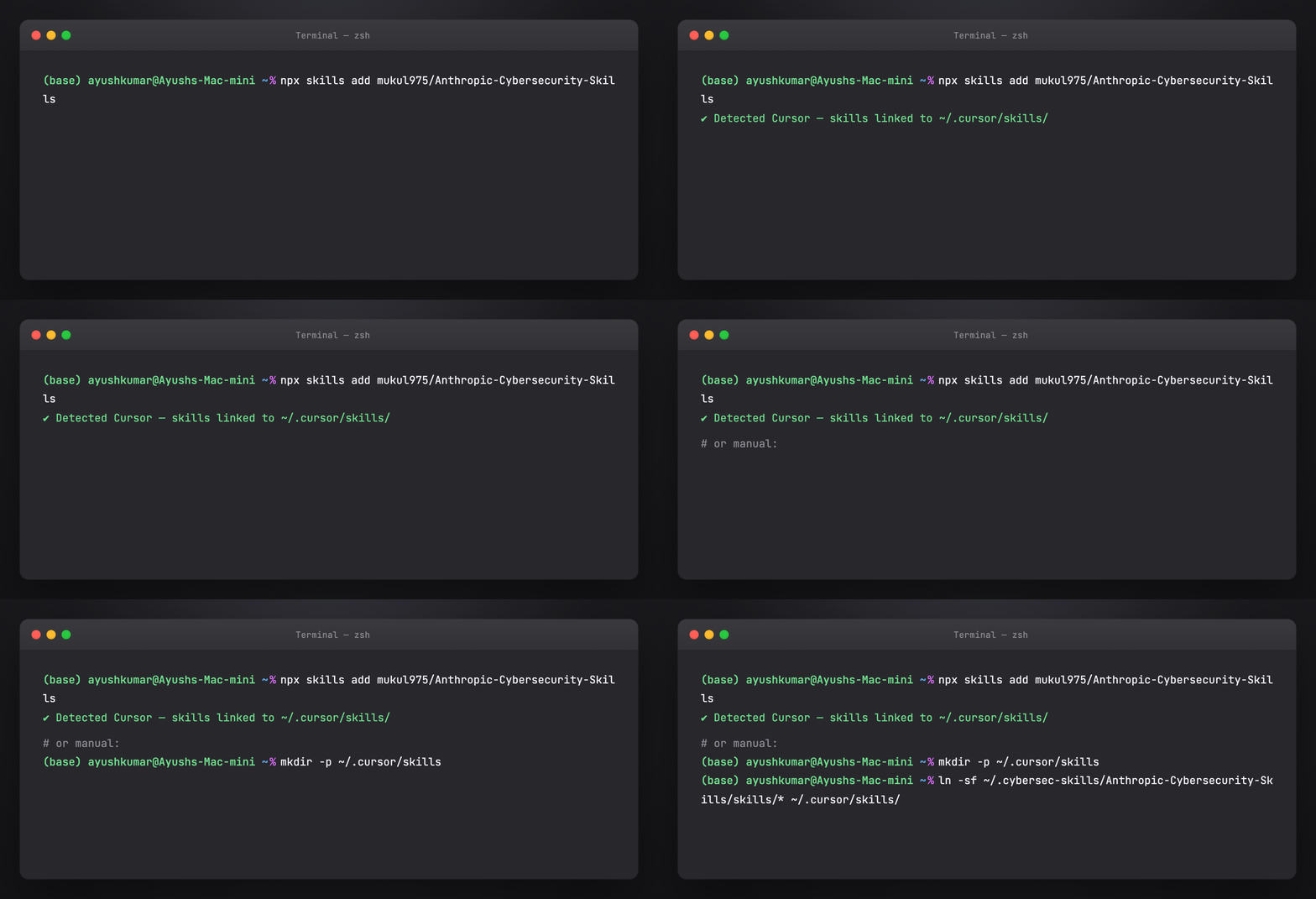
Cursor discovers skills listed in agent configuration and from ~/.cursor/skills/ (user skills).
Install via npx
Follow Cursor-specific prompts if the installer detects your environment.
Manual symlink
mkdir -p ~/.cursor/skills
ln -sf ~/.cybersec-skills/Anthropic-Cybersecurity-Skills/skills/* ~/.cursor/skills/
Project rules (optional)
Add to .cursor/rules/ or project instructions:
For security investigations, prefer skills from Anthropic Cybersecurity Skills.
Scan skill frontmatter by tags (dfir, threat-hunting, cloud-security) before loading full SKILL.md.
Always complete the Verification section before closing an investigation step.
Verify in Cursor
Open Agent mode and prompt:
I have a Windows memory dump. Which cybersecurity skills apply? Load the best match and show Prerequisites.
Part 8 — GitHub Copilot and Codex CLI
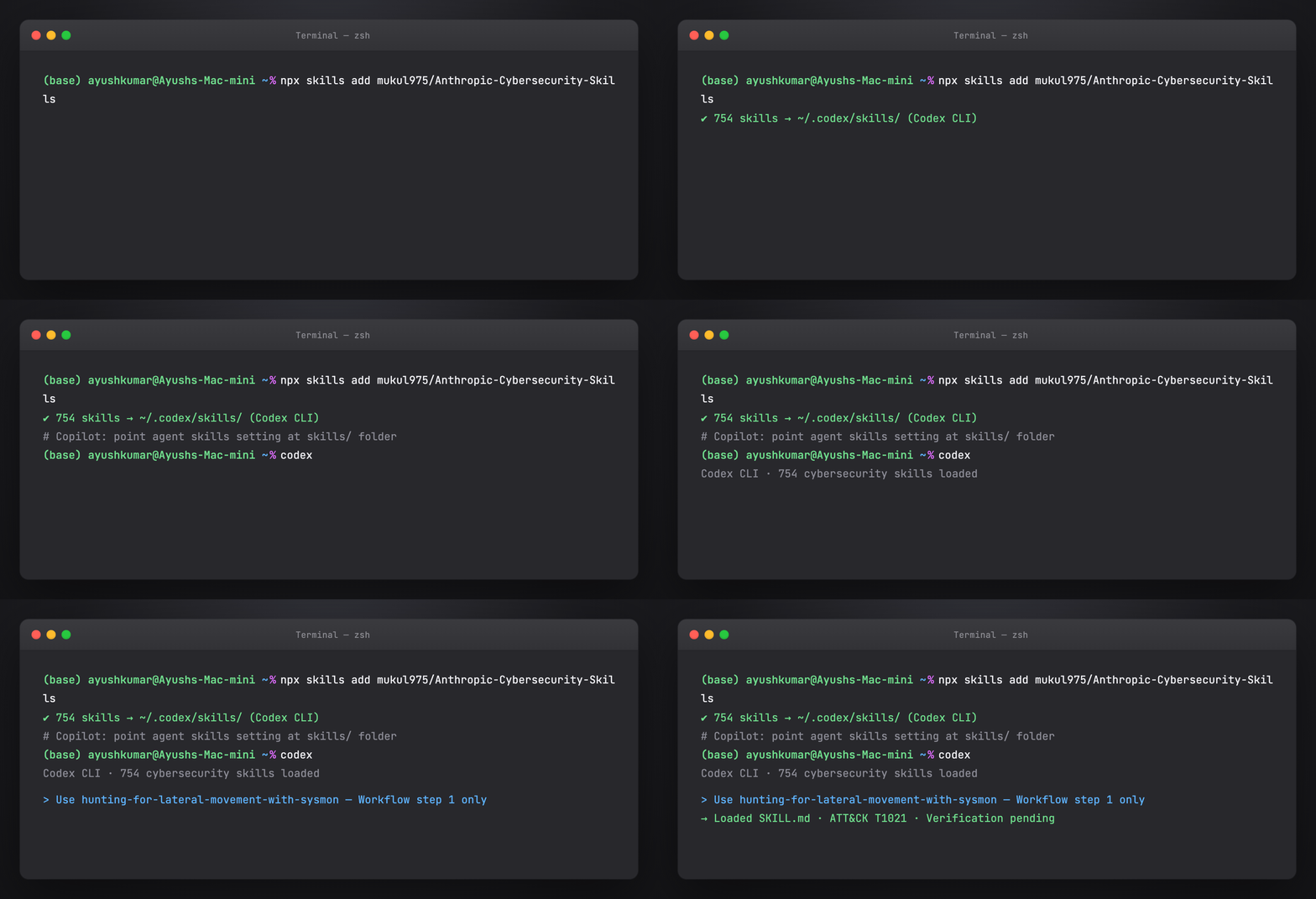
Both support agentskills.io when configured with a skills path.
Copilot (VS Code / JetBrains)
- Clone or
npx skills addthe repo - Point Copilot's agent skills setting at
skills/ - In agent chat: reference skill name in kebab-case (e.g.
hunting-for-lateral-movement-with-sysmon)
OpenAI Codex CLI
Codex reads frontmatter for routing; load full skills for multi-step IR workflows.
Part 9 — Gemini CLI and other platforms
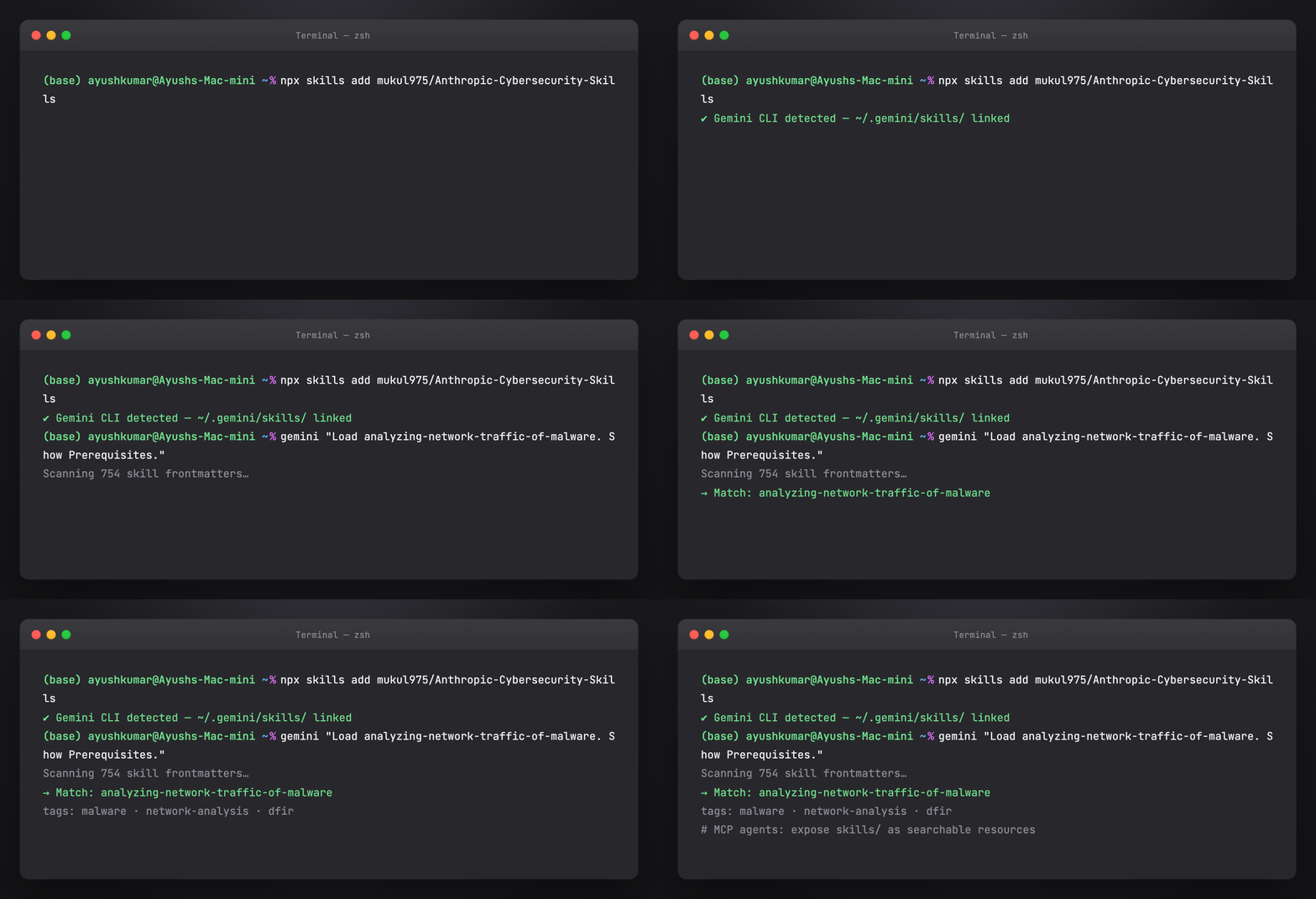
Compatible without custom forks:
| Category | Platforms |
|---|---|
| AI assistants | Claude Code, GitHub Copilot, Cursor, Windsurf, Cline, Aider, Continue, Roo Code, Amazon Q, Tabnine, Cody |
| CLI agents | OpenAI Codex CLI, Gemini CLI |
| Autonomous | Devin, Replit Agent, SWE-agent, OpenHands |
| Frameworks | LangChain, CrewAI, AutoGen, Semantic Kernel, Haystack, Vercel AI SDK, any MCP-compatible agent |
Gemini CLI: install skills via npx skills add, then invoke by skill name in prompts.
LangChain / CrewAI: mount skills/<name>/SKILL.md as tool description or system prompt segment; use frontmatter tags for retrieval routing.
MCP agents: expose skill search as an MCP resource listing frontmatter; fetch full SKILL.md on match.
Part 10 — Hermes Agent integration
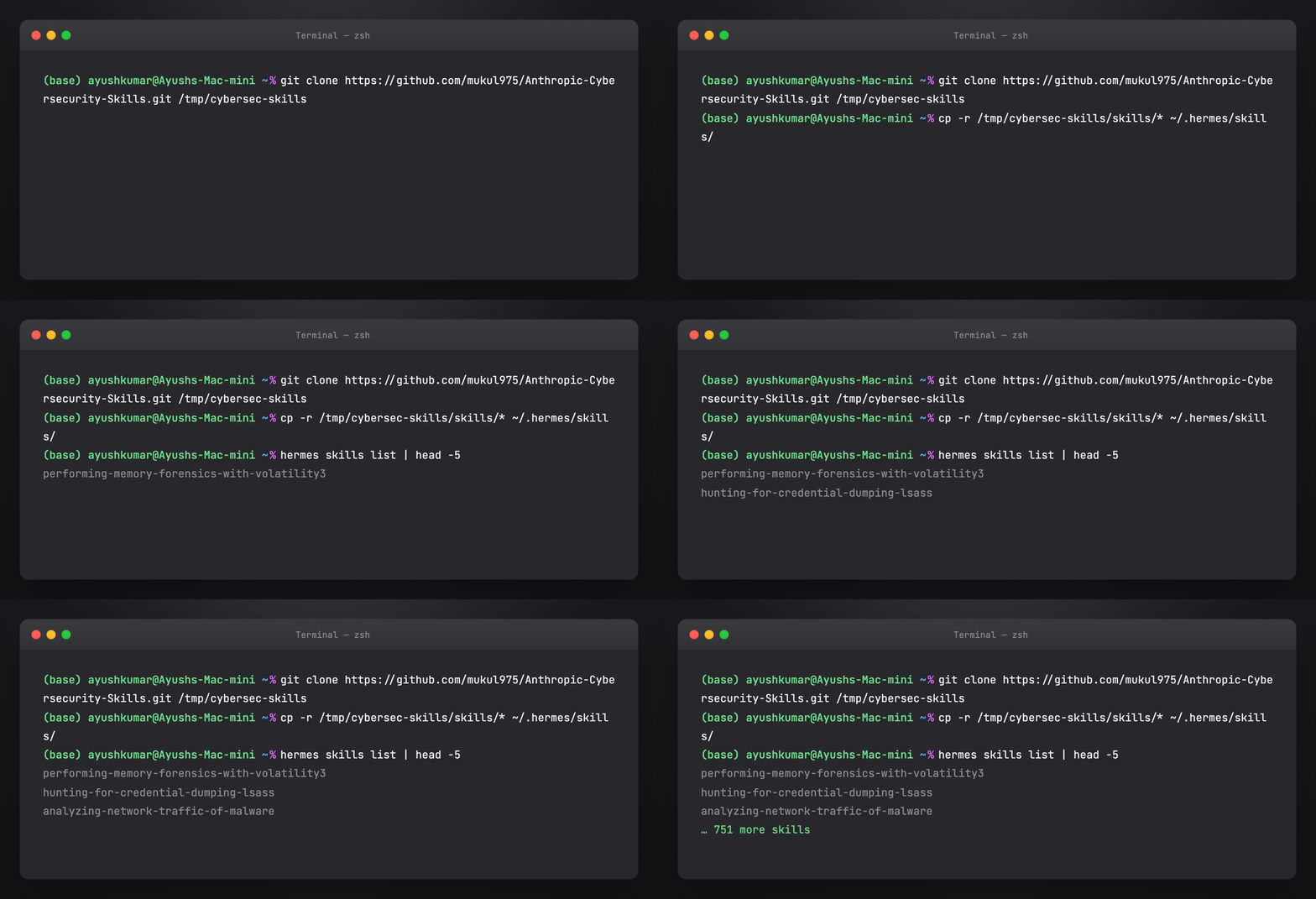
Hermes uses ~/.hermes/skills/ (same agentskills.io layout).
git clone https://github.com/mukul975/Anthropic-Cybersecurity-Skills.git /tmp/cybersec-skills
cp -r /tmp/cybersec-skills/skills/* ~/.hermes/skills/
hermes skills list | head
For SOC automation, combine with Hermes cron/Curator so frequently used skills stay prioritized. See Awesome Hermes Agent tutorial.
Example Hermes prompt:
Run a hypothesis-driven hunt for Kerberoasting using the threat hunting skills. Map hits to ATT&CK T1558.003.
Part 11 — Skill anatomy deep dive
Previously: this section was documentation-only (structure + sample YAML).
Now: you can run a real read-only example against the cloned upstream repo — inspect files, frontmatter, and sections. It does not execute Volatility or analyze a memory dump (that is Part 13).
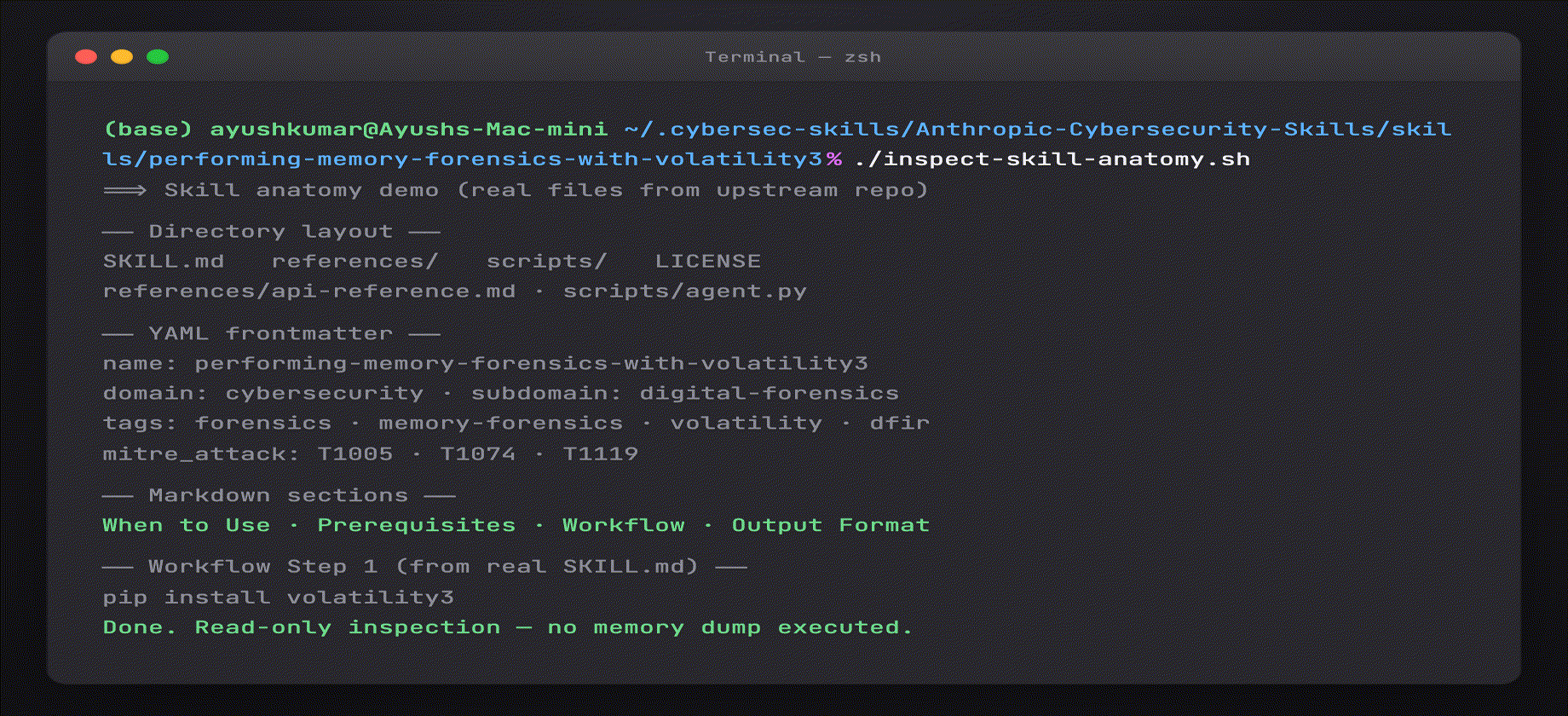
Run the real example yourself
Prerequisites: ./install-skills.sh completed (clone at ~/.cybersec-skills/).
cd guides/anthropic-cybersecurity-skills
chmod +x inspect-skill-anatomy.sh
./inspect-skill-anatomy.sh
# optional: ./inspect-skill-anatomy.sh hunting-for-credential-dumping-lsass
You will see real output from the upstream library — directory layout, live frontmatter, section headers, and a Workflow preview. No simulated text.
Every skill follows a consistent directory structure:
skills/performing-memory-forensics-with-volatility3/
├── SKILL.md              ← Definition (YAML + Markdown)
├── references/
│   ├── standards.md      ← Framework mappings
│   └── workflows.md      ← Deep technical reference
├── scripts/
│   └── process.py        ← Helper scripts
└── assets/
    └── template.md       ← Report templates
YAML frontmatter (from live upstream skill)
Output of ./inspect-skill-anatomy.sh on performing-memory-forensics-with-volatility3:
---
name: performing-memory-forensics-with-volatility3
description: Analyze volatile memory dumps using Volatility 3 to extract running processes,
  network connections, loaded modules, and evidence of malicious activity.
domain: cybersecurity
subdomain: digital-forensics
tags:
- forensics
- memory-forensics
- volatility
- ram-analysis
- malware-detection
- incident-response
version: '1.0'
author: mahipal
license: Apache-2.0
nist_csf:
- RS.AN-01
- RS.AN-03
- DE.AE-02
- RS.MA-01
mitre_attack:
- T1005
- T1074
- T1119
---
Frontmatter fields:
| Field | Purpose |
|---|---|
name |
kebab-case, 1–64 chars — agent invocation ID |
description |
Keyword-rich — drives discovery |
domain / subdomain |
Taxonomy |
tags |
Search facets |
atlas_techniques |
MITRE ATLAS IDs |
d3fend_techniques |
D3FEND countermeasures |
nist_ai_rmf |
AI RMF subcategories |
nist_csf |
NIST CSF 2.0 categories |
mitre_attack |
MITRE ATT&CK technique IDs (also in references/) |
Some skills also include atlas_techniques, d3fend_techniques, and nist_ai_rmf in frontmatter.
Markdown body sections (live skill)
From grep '^## ' SKILL.md on the same skill:
| Section | Purpose |
|---|---|
| When to Use | Trigger conditions — when should the agent activate this skill? |
| Prerequisites | Tools, access, environment |
| Workflow | Step-by-step commands and decision points |
| Key Concepts | Domain terminology and background |
| Tools & Systems | Tooling reference |
| Common Scenarios | Typical investigation patterns |
| Output Format | Expected deliverables / report shape |
Many skills also include a Verification block inside Workflow or Output Format. Always read the live SKILL.md — section names vary slightly by skill.
Optional directories:
- references/ — standards, long procedures, tool flags
- scripts/ — runnable helpers the agent can execute
- assets/ — checklists, report templates, diagrams
Part 12 — How agents discover and execute skills
User prompt: "Analyze this memory dump for signs of credential theft"
Agent internal process:
-
Scan 754 frontmatters (~30 tokens each)
→ Matchtags: forensics, credential-access, memory-analysis
→ 12 candidate skills -
Load top 3:
performing-memory-forensics-with-volatility3extracting-credentials-from-memory-dump-
detecting-credential-dumping-techniques -
Execute Workflow — Volatility3 plugins, LSASS access patterns, event log correlation
-
Verification — confirm IOCs, map to ATT&CK T1003 (Credential Dumping)
Without skills, the agent guesses commands and skips steps. With skills, it follows the same playbook a senior DFIR analyst would use.
Tips for better agent behavior
- Ask the agent to name the skill before executing
- Require Verification section output in every response
- For red team skills, state authorized scope in the prompt
- Use subset installs (10–20 skills) if the agent over-loads context
Part 13 — Walkthrough: credential theft in a memory dump
Authorized DFIR only. Use on images you own or have written permission to analyze.
Scenario: IR ticket — suspected Mimikatz on a Windows server. You have a .raw memory image (server01.raw).
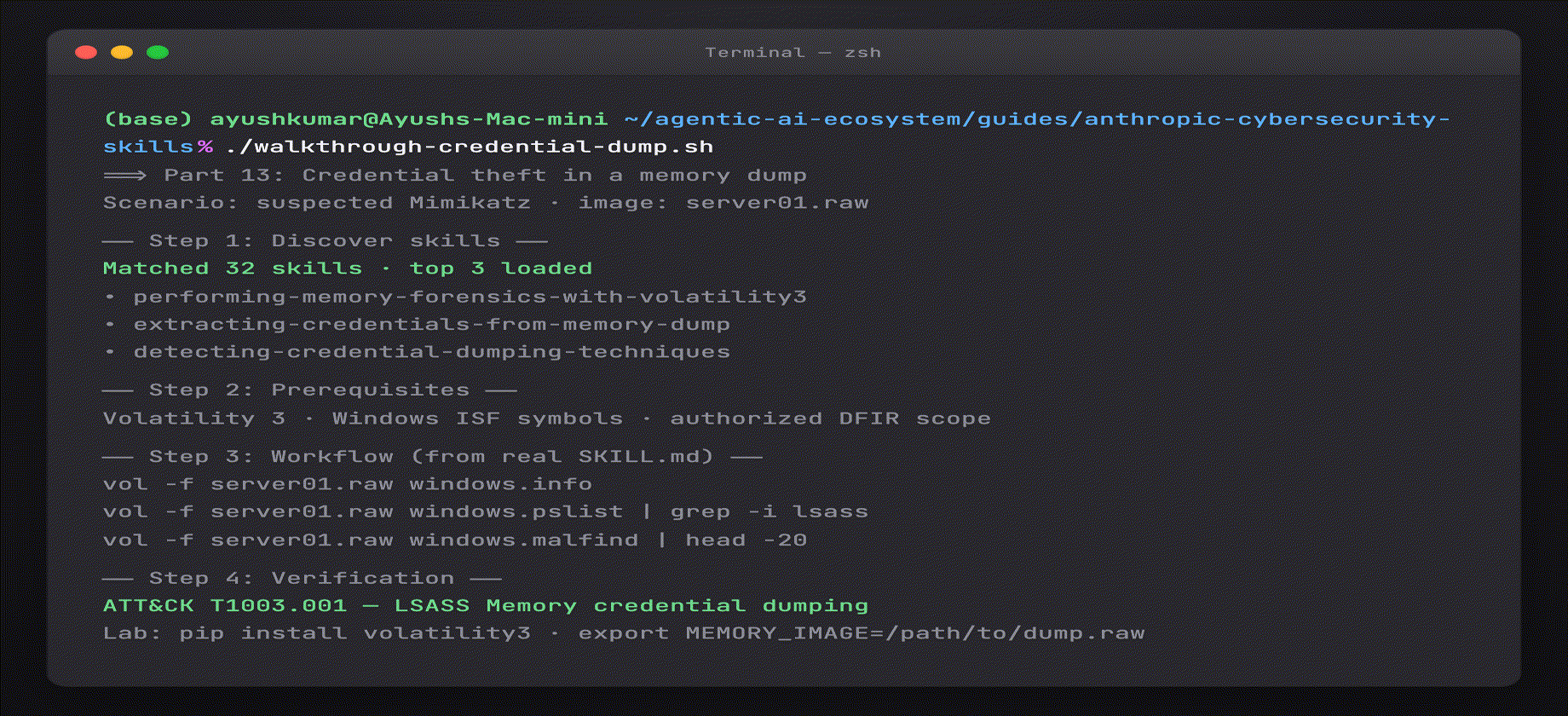
Run the real walkthrough
cd guides/anthropic-cybersecurity-skills
./install-skills.sh                    # if not done
chmod +x walkthrough-credential-dump.sh
./walkthrough-credential-dump.sh
What runs for real: skill discovery (32+ matches from live frontmatter scan), prerequisites pulled from upstream SKILL.md, Volatility commands extracted from extracting-credentials-from-memory-dump, verification checklist, Sysmon/T1003 correlation lines.
Lab extension (optional — runs vol when both are present):
pip install volatility3
export MEMORY_IMAGE=/path/to/your/server01.raw
./walkthrough-credential-dump.sh
Without Volatility or a dump file, the script still completes and prints the exact commands to run in your lab.
Step 1 — Activate the right skills
Agent prompt (or run the script above):
Authorized DFIR on image
server01.raw. Find skills for memory forensics and credential dumping. List prerequisites.
Real skills from upstream library (names corrected from live repo):
| Skill | Role |
|---|---|
performing-memory-forensics-with-volatility3 |
Memory baseline · processes · malfind |
extracting-credentials-from-memory-dump |
LSASS · hashdump · credential extraction |
detecting-credential-dumping-techniques |
Sysmon Event 10 · SIEM correlation |
Step 2 — Prerequisites check
From live SKILL.md (script prints these):
- Volatility 3 installed (
pip install volatility3) - Windows symbol tables (ISF) for target OS build
- Memory dump in raw/ELF format + chain of custody
- Legal authorization for credential extraction
Step 3 — Workflow execution
From extracting-credentials-from-memory-dump workflow:
vol -f server01.raw windows.info
vol -f server01.raw windows.pslist | grep -i lsass
vol -f server01.raw windows.malfind | head -20
vol -f server01.raw windows.hashdump
Typical order:
windows.info/windows.pslist— baseline processeswindows.malfind— injection indicators- LSASS-focused analysis + hashdump
- Correlate with Sysmon Event ID 10 via
detecting-credential-dumping-techniques
Step 4 — Verification
- Process accessed
lsass.exewith suspicious GrantedAccess (Sysmon 10) - In-memory injection / malfind hits near dump tools
- Timeline aligns with alert timestamp
- ATT&CK: T1003.001 — OS Credential Dumping: LSASS Memory
Step 5 — Report
Include framework mappings from skill frontmatter (mitre_attack: T1003, nist_csf: RS.AN-*) and detection rules from detecting-credential-dumping-techniques.
Regenerate the Part 13 GIF:
cd guides/anthropic-cybersecurity-skills/assets
python3 render_install_screenshots.py all --only 10-part13
Part 14 — Walkthrough: hypothesis-driven threat hunting
Scenario: Hunt for Kerberoasting in Enterprise SIEM.
Hypothesis
Service accounts may be targeted via Kerberoasting (T1558.003) in the last 30 days.
Skill selection
Tags: threat-hunting, kerberos, sigma, splunk or sentinel.
Agent loads hunting skill → Workflow:
- Deploy / validate Sigma rule for Kerberoasting
- Query rare RC4/HMAC service ticket requests
- Enrich service accounts — SPN exposure, password age
- Escalate confirmed anomalies to IR queue
Verification
- Non-noise hits with service account + weak crypto ticket
- ATT&CK technique documented
- Hunt notebook updated for repeatability
Part 15 — Walkthrough: multi-cloud breach scoping
Scenario: Credentials leaked; unknown activity in AWS, Azure, and GCP.
Skills to combine
| Cloud | Domain skills |
|---|---|
| AWS | CloudTrail analysis, IAM policy review, S3 public access |
| Azure | Entra sign-in logs, role assignment audit |
| GCP | Audit logs, service account key rotation |
Agent workflow:
- Contain — disable keys, force password reset (Incident Response skills)
- Discover — each provider's log skill in parallel
- Collect — unified timeline (Digital Forensics)
- Map — ATT&CK cloud techniques (T1078, T1530, etc.)
- Report — NIST CSF RS.AN / RS.MI categories
Part 16 — All 26 security domains
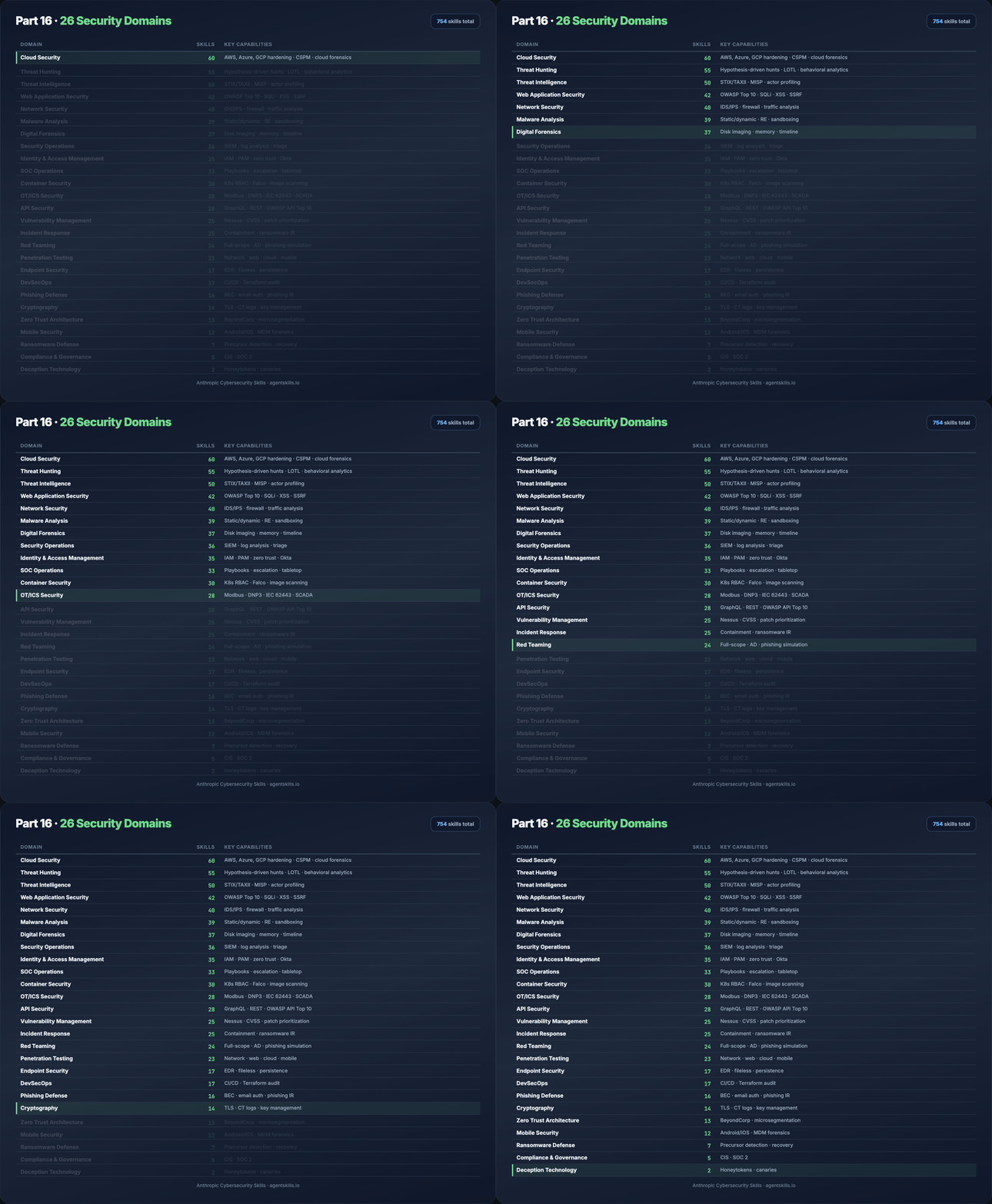
| Domain | Skills | Key capabilities |
|---|---|---|
| Cloud Security | 60 | AWS, Azure, GCP hardening · CSPM · cloud forensics |
| Threat Hunting | 55 | Hypothesis-driven hunts · LOTL · behavioral analytics |
| Threat Intelligence | 50 | STIX/TAXII · MISP · actor profiling |
| Web Application Security | 42 | OWASP Top 10 · SQLi · XSS · SSRF |
| Network Security | 40 | IDS/IPS · firewall · traffic analysis |
| Malware Analysis | 39 | Static/dynamic · RE · sandboxing |
| Digital Forensics | 37 | Disk imaging · memory · timeline |
| Security Operations | 36 | SIEM · log analysis · triage |
| Identity & Access Management | 35 | IAM · PAM · zero trust · Okta |
| SOC Operations | 33 | Playbooks · escalation · tabletop |
| Container Security | 30 | K8s RBAC · Falco · image scanning |
| OT/ICS Security | 28 | Modbus · DNP3 · IEC 62443 · SCADA |
| API Security | 28 | GraphQL · REST · OWASP API Top 10 |
| Vulnerability Management | 25 | Nessus · CVSS · patch prioritization |
| Incident Response | 25 | Containment · ransomware IR |
| Red Teaming | 24 | Full-scope · AD · phishing simulation |
| Penetration Testing | 23 | Network · web · cloud · mobile |
| Endpoint Security | 17 | EDR · fileless · persistence |
| DevSecOps | 17 | CI/CD · Terraform audit |
| Phishing Defense | 16 | BEC · email auth · phishing IR |
| Cryptography | 14 | TLS · CT logs · key management |
| Zero Trust Architecture | 13 | BeyondCorp · microsegmentation |
| Mobile Security | 12 | Android/iOS · MDM forensics |
| Ransomware Defense | 7 | Precursor detection · recovery |
| Compliance & Governance | 5 | CIS · SOC 2 |
| Deception Technology | 2 | Honeytokens · canaries |
Full domain notes: Domain catalog.
Underrepresented domains (good contribution targets): Deception Technology, Compliance & Governance.
Regenerate: python3 assets/render_table_gifs.py part16
Part 17 — MITRE ATT&CK v19.1 coverage
754/754 skills mapped. Validated with official mitreattack-python — no revoked or deprecated IDs.
v19.1 change: Defense Evasion split into Stealth (TA0005) and Defense Impairment (TA0112).
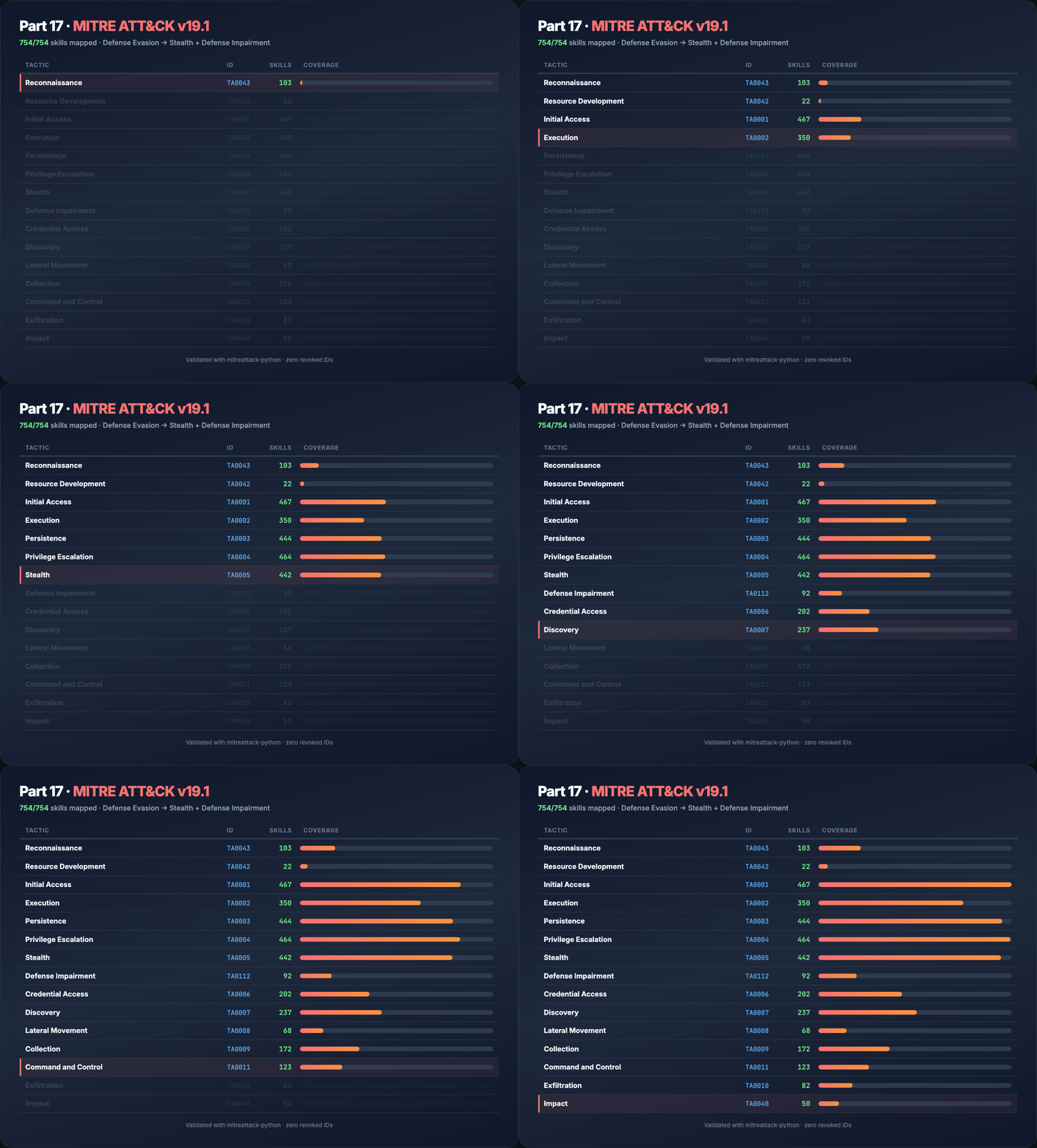
| Tactic | ID | Skills |
|---|---|---|
| Reconnaissance | TA0043 | 103 |
| Resource Development | TA0042 | 22 |
| Initial Access | TA0001 | 467 |
| Execution | TA0002 | 350 |
| Persistence | TA0003 | 444 |
| Privilege Escalation | TA0004 | 464 |
| Stealth | TA0005 | 442 |
| Defense Impairment | TA0112 | 92 |
| Credential Access | TA0006 | 202 |
| Discovery | TA0007 | 237 |
| Lateral Movement | TA0008 | 68 |
| Collection | TA0009 | 172 |
| Command and Control | TA0011 | 123 |
| Exfiltration | TA0010 | 82 |
| Impact | TA0040 | 50 |
Download ATT&CK Navigator layers from GitHub Releases for visualization.
Regenerate: python3 assets/render_table_gifs.py part17
Part 18 — Compliance and risk frameworks in practice
NIST CSF 2.0
Map skill outputs to Govern, Identify, Protect, Detect, Respond, Recover for audit trails. Example: memory forensics → Detect (DE.CM), Respond (RS.AN).
MITRE ATLAS
Use when the incident involves ML models — poisoning, evasion, model theft. Frontmatter field: atlas_techniques.
MITRE D3FEND
Pair offensive findings with defensive countermeasures — e.g. D3-NTA for network traffic analysis skills.
NIST AI RMF
For AI governance — document which agent skills were used, human-in-the-loop checkpoints, and measurement (MEASURE-* subcategories).
See Framework mappings for crosswalk tables and reporting templates.
Part 19 — Casky Playground and GARS-2026
Casky.ai Playground
Hands-on exercises without local install:
→ Launch Playground on Casky.ai
- Live cybersecurity skill exercises
- Real-time agent execution
- Interactive ATT&CK-mapped workflows
GARS-2026 Survey
Global Agentic AI Readiness Survey (SRH Berlin) — measures readiness for MCP, tool calling, and governance.
- ~10 minutes, anonymous
- Results published open access (CC-BY 4.0)
- Link in upstream README
Part 20 — Contributing your own skill
- Fork Anthropic-Cybersecurity-Skills
- Copy the skill template from
CONTRIBUTING.md - Add
skills/your-skill-name/SKILL.mdwith full frontmatter + four body sections - Add
references/standards.mdwith ATT&CK + framework IDs - PR title:
Add skill: your-skill-name - Review within ~48 hours for technical accuracy and agentskills.io compliance
Improve existing skills: framework mappings, fixed commands, new scripts/templates.
Report issues: inaccurate procedures or broken scripts → GitHub Issues.
Project follows Contributor Covenant.
Part 21 — Security, ethics, and authorized use
These skills describe ** offensive and defensive techniques**. Use only:
- On systems you own or have written authorization to test
- Within bug bounty / pentest / red team scope
- With human oversight for destructive or exfiltration steps
AI agents can execute commands quickly — mis-scoped prompts cause real damage. Always:
- State authorization in the prompt
- Use read-only modes where available
- Keep humans in the loop for containment and legal notification
Upstream Security Policy: responsible disclosure, 48-hour acknowledgment.
Part 22 — Troubleshooting
| Problem | Fix |
|---|---|
| Agent ignores skills | Confirm skills path; ask agent to name skill before acting |
| Context overflow | Install subset by domain; scan frontmatter only first |
| Skill not found | Use exact name from frontmatter (kebab-case) |
| Outdated ATT&CK IDs | git pull upstream; verify release tag |
| verify-install fails count | Shallow clone? Run full clone; expect ~754 dirs |
| npx skills add fails | Node 18+; check network; fall back to git clone |
| Hermes/Cursor path mismatch | Symlink to platform-specific skills dir (see Parts 6–10) |
Run ./verify-install.sh after every pull.
Part 23 — Citation and license
Citation (BibTeX)
@software{anthropic_cybersecurity_skills,
  author       = {Jangra, Mahipal},
  title        = {Anthropic Cybersecurity Skills},
  year         = {2026},
  url          = {https://github.com/mukul975/Anthropic-Cybersecurity-Skills},
  license      = {Apache-2.0},
  note         = {754 structured cybersecurity skills for AI agents,
                  mapped to MITRE ATT\&CK, NIST CSF 2.0, MITRE ATLAS,
                  MITRE D3FEND, and NIST AI RMF}
}
License
Apache License 2.0 — use, modify, and distribute in personal and commercial projects.
Next steps
./install-skills.sh&&./verify-install.sh- Wire skills into your daily driver (Cursor or Claude Code)
- Run the Part 13 walkthrough:
./walkthrough-credential-dump.sh - Import ATT&CK Navigator layer from Releases
- Contribute a skill in an underrepresented domain
Upstream: github.com/mukul975/Anthropic-Cybersecurity-Skills