Full tutorial
flowchart TB
    subgraph core["Hermes core"]
        CLI[CLI / TUI]
        GW[Gateway 18+ platforms]
        CUR[Curator cron 7-day]
    end
    subgraph memory["Memory"]
        MEM[Session memory]
        SKL[Skill library]
    end
    subgraph extend["Ecosystem"]
        COM[Community skills]
        PLG[Plugins]
        MCP[MCP servers]
        GUI[hermes-workspace / mission-control]
    end
    CLI --> MEM
    CLI --> SKL
    CUR --> SKL
    SKL --> COM
    CLI --> PLG
    CLI --> MCP
    GW --> CLI
Session workflow
- Install Hermes and choose a provider
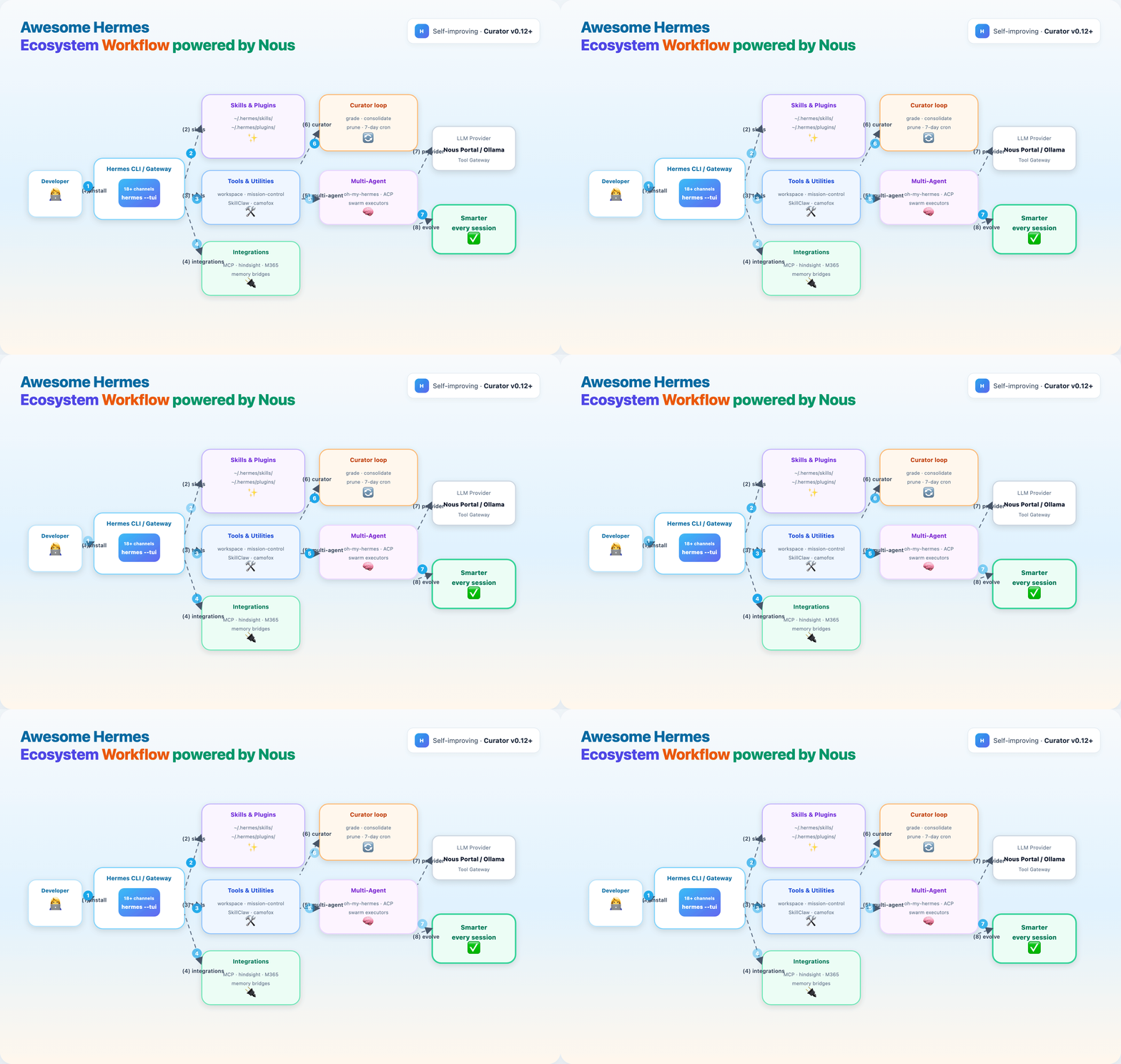
- Stack ecosystem layers: skills → tools → integrations → multi-agent
- Curator refines the skill library on a 7-day cycle
| Requirement | Check |
|---|---|
| macOS, Linux, WSL2, or Windows | — |
| Git installed | git --version |
| Internet for installer | — |
| Optional: Telegram/Discord token | For Part 6 gateway |
The Hermes installer pulls uv, Python 3.11, Node 22, ripgrep, and ffmpeg automatically.
Part 1 — Install Hermes Agent
macOS / Linux / WSL2 / Termux
curl -fsSL https://hermes-agent.nousresearch.com/install.sh | bash
source ~/.zshrc   # or source ~/.bashrc
Headless VPS (skip browser deps):
Windows (PowerShell)
Or use the Hermes Desktop installer on macOS/Windows.
Verify from this guide
Expected: hermes on PATH, hermes doctor clean or with fixable warnings.
Config lives under ~/.hermes/ (Windows: %LOCALAPPDATA%\hermes).
Part 2 — Choose a provider
Easiest: Nous Portal (recommended for first run)
One OAuth flow — models + Tool Gateway (search, images, TTS, browser):
Interactive picker
Bring your own keys
Copy reference keys:
Ollama (local) — set OpenAI-compatible base URL in hermes model or config docs.
Docs: Configuration · Nous Portal
Part 3 — First conversation
Try:
- "What tools do you have enabled?"
- "Create a skill for how I like commit messages formatted."
hermes --continue— resume last session
Quick reference:
| Command | Purpose |
|---|---|
hermes |
Chat |
hermes doctor |
Diagnose |
hermes update |
Upgrade |
hermes tools |
Enable/disable tools per platform |
hermes gateway |
Start messaging bridge |
Part 4 — Skills & Plugins
Hermes creates skills from experience and maintains them via the Curator (v0.12+). Plugins extend core tools (search, memory, shell compression). Together they are procedural + operational memory.
flowchart LR
    A[Session] --> B[Built-in skills]
    A --> C[~/.hermes/skills/]
    A --> D[~/.hermes/plugins/]
    C --> E[agentskills.io]
    D --> F[Hooks + tools]
    G[Curator 7-day] --> C
4.1 — Install skills layer
chmod +x install-ecosystem.sh install-starter-pack.sh
./install-ecosystem.sh skills
# or lightweight starter only:
./install-starter-pack.sh
| Skill | Tag | Install path | Why |
|---|---|---|---|
| wondelai/skills | production | ~/.hermes/skills/wondelai-skills |
380+ cross-platform skills |
| litprog-skill | beta | ~/.hermes/skills/litprog-skill |
Literate programming |
| youtube-skills | production | ~/.hermes/skills/youtube-skills |
VPS-safe YouTube transcripts |
| drawio-skill | production | ~/.hermes/skills/drawio-skill |
NL → architecture diagrams |
| Anthropic-Cybersecurity-Skills | production | optional clone | 753+ MITRE security skills (large) |
| open-design | production | per repo README | 31 design skills, 129 design systems |
| hermes-skill-factory | beta | skill folder | Auto-generate skills from workflows |
| hermes-incident-commander | beta | skill folder | Autonomous SRE / self-healing |
Manual pattern (any skill):
git clone --depth 1 <repo-url> ~/.hermes/skills/<name>
# Each skill needs SKILL.md with YAML frontmatter (agentskills.io)
Discover more: skilldock.io · hermeshub · agentskills.io
4.2 — Install plugins layer
Plugins clone to ~/.hermes/plugins/. Enable in Hermes config (see Plugins docs).
| Plugin | Tag | What it does |
|---|---|---|
| hermes-web-search-plus | beta | Route search across Serper, Tavily, Exa |
| rtk-hermes | beta | Compress shell output 60–90% before LLM |
| mnemo-hermes | beta | pgvector semantic memory on Ollama |
| Mnemosyne | beta | Local hybrid search + knowledge graph |
| hermes-curator-evolver | beta | Evidence-driven Curator companion |
| plur | beta | Portable shared memory (YAML engrams) |
| hermes-payguard | experimental | USDC / x402 payments with limits |
| agent-analytics-hermes-plugin | beta | Signals analytics dashboard tab |
4.3 — Curator + skill evolution
Built-in Curator (v0.12+) grades, consolidates, and prunes skills every 7 days. Pair with:
| Tool | Tag | Role |
|---|---|---|
| Built-in Curator | production | Automatic skill library maintenance |
| SkillClaw | production | Evolve/dedupe skills from session data |
| hermes-dojo | beta | Find weak skills, auto-iterate |
| hermes-agent-self-evolution | official | DSPy/GEPA prompt evolution |
Verify skills load:
ls ~/.hermes/skills/
hermes --tui
# Ask: "What skills are available? Try /skill-name if configured."
Part 5 — Tools & Utilities
GUIs, linters, browsers, and operator utilities that sit beside the CLI — not replacements.
Clones to ~/.hermes/ecosystem-tools/. Follow each repo's README for npm install, pip install, or Docker.
5.1 — GUI dashboards
| Tool | Tag | Best for | Install notes |
|---|---|---|---|
| hermes-workspace | production | Chat + terminal + skills manager | Nous Hackathon winner; Hermes-native |
| mission-control | production | Fleet, tasks, cost tracking | SQLite self-hosted dashboard |
| hermes-web-ui | production | Token/cost analytics, cron, 8 channels | Vue 3 + BFF |
| hermes-ui | beta | Single-file glassmorphic UI | Python proxy on :3333 |
| hermes-desktop | beta | Native macOS workspace | Direct SSH to host |
Example — hermes-workspace:
cd ~/.hermes/ecosystem-tools/hermes-workspace
# Follow README: typically pnpm install && pnpm dev
# Point at your local Hermes gateway / CLI socket
5.2 — Operator & quality utilities
| Tool | Tag | Role |
|---|---|---|
| SkillClaw | production | skillclaw doctor hermes — skill health |
| lintlang | beta | Lint prompts/configs (HERM v1.1 score) |
| agenttrace | beta | Post-run session audit TUI |
| Clarvia | production | Score MCP servers for agent-readiness |
| flowstate-qmd | beta | Anticipatory memory / pre-fetch RAG |
5.3 — Browser & headless tooling
| Tool | Tag | When to use |
|---|---|---|
| camofox-browser | production | VPS blocked by Cloudflare — stealth headless API |
| vessel-browser | experimental | Full AI-native Linux browser |
| Built-in Playwright | production | Default; skip with --skip-browser on install |
5.4 — Deployment utilities
| Tool | Tag | Notes |
|---|---|---|
| hermes-agent-docker | beta | Minimal sandbox image |
| nix-hermes-agent | beta | Reproducible NixOS module |
| evey-setup | beta | One-command stack + 29 plugins |
| openclaw-to-hermes | beta | Migration helper |
Part 6 — Integrations & Bridges
Connect Hermes to memory backends, MCP servers, productivity suites, and other agents.
6.1 — MCP integration pattern
- Add server block to Hermes MCP config (see MCP docs)
- Restart session; verify with
hermes toolsor ask Hermes to list MCP tools - Score servers with Clarvia before trusting production workflows
| MCP / integration | Tag | Surface |
|---|---|---|
| MeiGen-AI-Design-MCP | production | Image/video gen (9 models) |
| mistral-mcp | beta | OCR, audio, Codestral FIM, agents |
| Not Human Search | production | Discover 8,600+ MCP servers |
| Global Chat | production | Cross-protocol agent discovery |
| hermes-blockchain-oracle | experimental | Solana on-chain data |
| hermes-council | experimental | Adversarial multi-perspective debate |
Example MCP config snippet (adjust paths after clone):
# Reference only — merge into your Hermes MCP settings
mcp_servers:
  meigen-design:
    command: node
    args: ["~/.hermes/ecosystem-tools/MeiGen-AI-Design-MCP/dist/index.js"]
6.2 — Memory bridges
| Integration | Tag | Pattern |
|---|---|---|
| hindsight | production | retain / recall / reflect over long history |
| honcho-self-hosted | beta | Self-hosted Honcho user modeling |
| yantrikdb-hermes-plugin | beta | Rust backend with explainable recall |
| plur | beta | Portable YAML engram memory |
Memory hygiene: keep USER.md / MEMORY.md concise; let Curator prune stale skills.
6.3 — Productivity & device bridges
| Integration | Tag | Connects |
|---|---|---|
| microsoft-workspace-skill | beta | Outlook / M365 via Graph API |
| hermes-nextcloud | beta | WebDAV, Notes, CalDAV, CardDAV |
| hermes-android | beta | Android device control |
| agent-android | beta | LAN Android over WiFi |
| hermes-spotify-skill | beta | Headless Linux / Raspberry Pi Spotify |
| clawsocial-hermes-plugin | beta | Social discovery network |
6.4 — Cross-agent bridges
| Bridge | Tag | Handoff |
|---|---|---|
| evey-bridge-plugin | beta | Claude Code ↔ Hermes context share |
| hermes-agent-acp-skill | beta | Route subtasks to Codex / Claude Code |
| zouroboros-swarm-executors | experimental | Local executor bridge for Claude + Hermes |
Part 7 — Multi-Agent & Swarms
When one Hermes session is not enough — orchestration, delegation, and fleet visibility.
flowchart TB
    H[Hermes primary] --> OH[oh-my-hermes skills]
    H --> ACP[hermes-agent-acp-skill]
    ACP --> CC[Claude Code]
    ACP --> CX[Codex]
    H --> MC[mission-control fleet]
    OH --> R[ralplan / ralph / triage]
7.1 — oh-my-hermes (orchestration skills)
| Skill | Purpose |
|---|---|
deep-research |
Multi-step research pipeline |
deep-interview |
Structured requirements gathering |
ralplan |
Planner → Architect → Critic consensus |
ralph |
Verified execute → verify → iterate |
triage |
Prioritize incoming work |
autopilot |
End-to-end dispatcher playbook |
Install: included in ./install-ecosystem.sh multiagent → ~/.hermes/skills/oh-my-hermes/
7.2 — Specialized agent packs
| Project | Tag | Agents |
|---|---|---|
| opencode-hermes-multiagent | beta | 17 role-specialized OpenCode agents |
| bigiron | beta | SDLC crew + Supermodel code graph |
| hermes-plugins | beta | Inter-agent bridge between Hermes instances |
7.3 — Fleet dashboards
Pair multi-agent skills with mission-control (Part 5) for:
- Task dispatch across agents
- Cost tracking per session
- SQLite-backed job history
7.4 — Experimental swarms
| Project | Tag | Idea |
|---|---|---|
| Ankh.md | experimental | TAW Agent × Hermes swarm framework |
| gladiator | experimental | Competing autonomous agent companies |
| NemoHermes | experimental | NVIDIA Spark GPU routing |
7.5 — When to use multi-agent
| Scenario | Use |
|---|---|
| Single repo, one developer | Hermes CLI + skills |
| Research → plan → execute chain | oh-my-hermes ralplan + ralph |
| Best tool per subtask | hermes-agent-acp-skill |
| Many agents, cost visibility | mission-control + cron |
| Claude Code already in workflow | evey-bridge + ACP skill |
Part 8 — Messaging gateway (optional)
Hermes ships 18 built-in platforms: Telegram, Discord, Slack, WhatsApp, Signal, Feishu/Lark, WeCom, QQBot, Yuanbao, and more. Microsoft Teams via plugin.
Configure tokens via hermes setup or config — see Messaging Gateway docs.
Security: keep DM pairing / allowlists on until you trust exposure. Run hermes doctor after gateway changes.
Migrating from OpenClaw
Community fallback: openclaw-to-hermes (older Hermes versions).
Part 9 — Deployment & cron
| Method | Tag | Notes |
|---|---|---|
Local / $5 VPS |
— | Default; use --skip-browser on headless |
hermes-agent-docker |
beta | Minimal sandbox image |
nix-hermes-agent |
beta | Reproducible NixOS |
| Modal / Daytona / Vercel Sandbox | — | Serverless terminal backends (built into Hermes) |
evey-setup |
beta | Opinionated stack + 29 plugins |
Cron jobs for autonomous loops:
Part 10 — Level-up blueprints
Opinionated bundles from awesome-hermes-agent:
Memory that compounds
Built-in memory → honcho-self-hosted → hindsight → plur (portable engrams) → flowstate-qmd (anticipatory RAG).
Self-improvement without drift
hermes-agent-self-evolution + scheduled regression + lintlang + second evaluation pass.
Operator cockpit
hermes-workspace daily UI + mission-control for fleet/costs.
Multi-agent execution
hermes-agent-acp-skill (route to Codex/Claude Code) + oh-my-hermes + opencode-hermes-multiagent.
Paperclip-managed ops
hermes-paperclip-adapter + cron + dashboard for governed autonomous work.
Full resource list: ecosystem catalog.
Part 11 — End-to-end test
Run the full ecosystem stack:
./verify-install.sh
./install-ecosystem.sh all    # or layer by layer: skills, plugins, tools, integrations, multiagent
hermes doctor
hermes --tui
In TUI, verify each layer:
- Skills — "List skills in ~/.hermes/skills"
- Plugins — "Which plugins are enabled?"
- Tools — open hermes-workspace or mission-control if installed
- Integrations — "List MCP tools available"
- Multi-agent — "Use oh-my-hermes triage on this task"
Optional: hermes gateway + Telegram message test.
Troubleshooting
| Symptom | Fix |
|---|---|
hermes: command not found |
source ~/.zshrc or re-run installer |
| Doctor fails on provider | hermes setup --portal or hermes model |
| YouTube transcripts fail on VPS | Install youtube-skills (cloud IP blocked by default) |
| Browser tools OOM on small VPS | Install with --skip-browser; use camofox-browser plugin |
| Skills not visible | Confirm SKILL.md in ~/.hermes/skills/<name>/; restart session |
| Plugins not loading | ./install-ecosystem.sh plugins; enable in Hermes config |
| Ecosystem clone failed | Check git; retry one layer: ./install-ecosystem.sh skills |
| MCP tools missing | Add server to Hermes MCP config; restart session |
| Multi-agent handoff fails | Install hermes-agent-acp-skill; verify delegate agent installed |
| GUI tool won't start | cd ~/.hermes/ecosystem-tools/<name> and follow repo README |
| OpenClaw migration gaps | hermes claw migrate then compare cron + channel config |
What's next
- Browse the ecosystem catalog by category
- Join Nous Discord
- Star NousResearch/hermes-agent and awesome-hermes-agent
- Contribute new ecosystem entries via awesome-hermes-agent PRs
Summary
| Step | Command / artifact |
|---|---|
| Install | curl … install.sh \| bash |
| Provider | hermes setup --portal |
| Verify | ./verify-install.sh |
| Chat | hermes --tui |
| Skills & plugins | ./install-ecosystem.sh skills + plugins |
| Tools & utilities | ./install-ecosystem.sh tools |
| Integrations | ./install-ecosystem.sh integrations |
| Multi-agent | ./install-ecosystem.sh multiagent |
| Full stack | ./install-ecosystem.sh all |
| Catalog | ecosystem catalog |
| Gateway | hermes gateway |
Hermes is the only agent with a closed learning loop — install once, let skills compound, curate intentionally, extend from the ecosystem when you need superpowers.